How to Correct or Change Your Name on a Crypto Exchange Account
Name spelled differently on your ID and your exchange account? Look for a name or update option on the account’s identity verification page; if none fits, contact support with your ID to hand.
Jump to a section
“My name is spelled differently on my ID and on my crypto exchange account. What now?” First work out which of three cases you’re in, because each one is corrected in its own way.
- You typed it wrong, or the check misread it. A missing or extra letter, first and last names swapped, a middle name left out. Go to correcting a typing mistake.
- Your legal name has changed after marriage, divorce or a formal change of name, and your ID now shows the new one. Go to updating to a new legal name.
- It’s the same name, written another way. Your ID uses a non-Latin script, carries accents the form dropped, or orders your names differently. Go to scripts, accents and name order.
If the name on the exchange is right and it’s the bank account you pay from that differs, skip to bank transfers in another name.
Correcting a typing mistake
Still on the screen where you confirm your details? Fix it there. Identity steps ask that everything you enter be “consistent with your ID documents”, and once you confirm, you may not be able to change it yourself.
Once it’s confirmed:
- Open the identity verification page in your account and look for the name option. Depending on the exchange, it’s called Update name, [Edit Name], Legal name or Name Refresh, or KYC Verification Update. Where to correct your name on each exchange lists where each one sits.
- Pick the reason that fits. Some name options accept only a short list, such as wrong characters, missing or extra characters, the wrong name order or character recognition issues, so check which ones your exchange’s option accepts.
- Type the name exactly as your ID prints it, middle names included. On Bitget the middle name goes in the first-name box, after your first name, according to its web guide, and missing middle names are on its list of rejection reasons. Check spaces, hyphens and apostrophes against the document too, letter by letter, before you submit.
- Complete the security or face check the page asks for, then watch the page and your registered email for the result. A screenshot of what you submitted helps if you later need to contact support.
No option for a typo? Contact support rather than picking a reason that doesn’t fit. A fixed list can leave a typing mistake out: the seven reasons on one exchange’s list don’t include it, and where your reason isn’t on the drop-down, the update pages send you to customer service. Where an exchange uses a form instead of an option in your account, the form asks for your previous name, the new one, the reason and a valid ID.
When to stop resubmitting. Bybit says a rejected name correction is “usually due to low similarity” and asks you to try again with your full, real name. If that’s exactly what you entered, we’d stop trying and submit a case to customer support.
The same name at both levels. Two exchanges want the same name at every level, and a mismatch between levels is a listed reason for failure. If your details were wrong at the first level, one of them says to go straight to the higher one, whose details become the final record.
Opening a second account in the right name isn’t a fix any of these exchanges describes. Two of them allow verification on a single account, whether they count it per user or per identity document. If you’ve already tried, the “ID number has been used” message and its three fixes covers what happens next.
Where to correct your name on each exchange
| Exchange | Where to start | What it covers | Also on the help page |
|---|---|---|---|
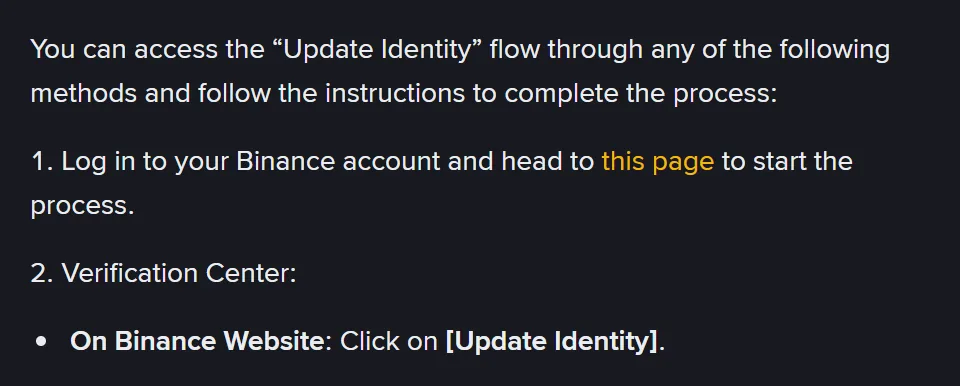
| Binance | [Identification] page, then [Update Identity] | Seven listed reasons, including a changed name on the document and switching to “a system-recognizable language” | Withdrawal Only mode while the update is checked |
| Bybit | Identity Verification page, Update Info, then Update name | Wrong, missing or extra characters, name order, character recognition issues; names changed in government records go through Update KYC instead | About 5 minutes, up to one working day; usable again 30 days after the last successful change |
| OKX | Profile > Identity verification, then Legal name or Name Refresh, where shown | A legal name change, spelling, transliteration, accents or name order, for the same person | No entry shown means no self-service for that account or field, so contact support |
| Kraken | Change account info form, on its support site | A mistake or a legal name change | Details can’t be changed manually once submitted |
| Bitget | [Edit Name], on the Individual Verification page | KYC information that doesn’t match your legal name | Asks for the correct name and supporting documents; a separate reset covers name language changes |
| MEXC | KYC Verification Update, after Advanced KYC | Correcting or updating your information | Wrong details at the Primary stage: go straight to Advanced KYC instead |
The table follows each exchange’s help-centre pages as they stood in October 2026. Times and waiting periods change, so check the current wording in the help centre or app before you start.
Whatever the label, a correction on these exchanges keeps the account with the same person and isn’t a change of owner: an update can’t replace the account holder, transfer verification or move the account to another person. When there’s no option to use, tell support why the information must change, which field it is and what it shows now, the correct information, and the official document you can provide.
Updating to a new legal name
We’d get the ID in your new name before you touch the exchange, because every page that describes a legal name change asks for a document showing it: a current official document showing the correct name, a valid ID uploaded with the Change account info form, or the changed document itself, chosen and uploaded through [Update Identity].
None of these pages names a marriage certificate, a divorce order or a deed poll as a document for a name update, and [Edit Name] asks for “the required supporting documents” without listing them. If a certificate like that is all you have so far, ask support whether it’s accepted before you begin, because starting an update can restrict the account.
What happens while the change is checked depends on the exchange. You’ll meet one of three set-ups:
- Withdrawals only. Declaring an update can put the account in “Withdrawal Only” mode “until all of your new information has been submitted and verified”. That page gives no review time; an email tells you when the review is complete.
- A separate function for a legal change. A quick name correction may not cover names changed in government records, which then go through a separate KYC update instead. Where a time is given for amending verified details, it’s approximately two hours, and the option isn’t open to suspended or restricted accounts.
- A full reset. A reset for changes such as nationality, ID or name can leave the account unverified, with deposits, withdrawals and trading restricted, until you verify again with a new ID and a face check that matches your earlier one. The reset page says this usually takes 1–3 business days, though the same exchange’s general verification FAQ says 1 business day.
Then deal with proof of address. Three exchanges want it in the same name as your verified identity, whether they put it as a document issued in your name that matches the account owner’s, a name that matches your KYC document, or a name and address that match what you entered during verification. A bill in your new name won’t match the name on file until the update is approved. What each exchange accepts is set out in proof of address for crypto exchanges, and what gets rejected.
If you found the mismatch because the exchange asked you to confirm your details again, why exchanges re-check verified accounts covers that request.
Scripts, accents and name order
A name in another script. [Update Identity] also accepts changing “the name to a system-recognizable language” as a reason, for example moving from a local-language ID card to an English-language passport. Legal name and Name Refresh cover transliteration and accent corrections, and one exchange has a separate reset for a change of name language. If the document itself was turned down because of its script, see ID documents that get turned down, and what to use instead.
Two spellings on one passport. A passport can show your name twice, once in the printed fields and again in the machine-readable zone. The international passport standard, ICAO Doc 9303, has the machine-readable name printed in capitals without diacritical marks, so names there “are represented differently from those in the VIZ”, the zone designed for reading by eye. The issuing country transliterates special letters and may shorten a long name to fit; the standard’s recommended table turns ä into AE or A, and ü into UE, UXX or U. None of the six exchanges says which version to type. If the account holds one and your ID check read the other, though, that’s the kind of difference a transliteration and accent correction covers.
Why one letter matters. NIST SP 800-63A, US identity-proofing guidance for agencies and identity providers, lists first name, middle name or initial, and last name among the core attributes an identity service should collect. It names records that are “difficult to match as a result of name formatting and data entry design” as a common problem, and says trained reviewers handling a partial mismatch must look at evidence supporting it, giving a “change of name” as an example. That’s the general reasoning behind checking a changed name against evidence.
Name order and single names. ICAO leaves it to each issuing country to decide which part of your name is the “primary identifier”. That can be the family name, a maiden or married name, the main name, or the whole name when it can’t be divided, so a form with First Name and Last Name boxes may not line up with it. Two exchanges in the table list name order among the things a correction fixes.
If your ID shows a single name, ask support how to fill both boxes before you submit.
Bank transfers in another name
Your verified name can be right and a bank transfer can still fail. The name rule for payments sits on payment pages rather than identity pages, and none of those pages says whether a bank-name mismatch changes your verification status. Two exchanges spell the rule out:
- Kraken’s deposit checklist says the name on the bank account you deposit from must match the name on your exchange account. A joint account works if “one of the names on the bank account” matches. A personal account should be funded only from a personal bank account in the same name, and not through a third-party payments processor.
- Bybit’s deposit FAQ says the payer’s details, such as full name and tax ID, must match its KYC record precisely, and “Using third-party accounts for payment transfers is strictly prohibited.” The withdrawal FAQ says the same of the receiving account. A mismatch “may cause the deposit to fail and further review is required”, and it says that review may take 7–14 working days.
What to do:
- Line up the name on your ID, the one on the exchange account and the one on the bank account. Correct whichever is out of date, through the exchange’s name option for its record or through your bank for the bank’s.
- Deposit from, and withdraw to, an account in your own name. An account held only by a partner or relative meets neither rule; a joint account with your name on it meets the first.
- If a payment has already bounced, follow its status on the exchange’s order page. When it shows “Refund In Progress”, that deposit FAQ asks you to submit refund details from there and says it reviews the documents within 48 hours.
Re-verifying, expired IDs and fixing a name for someone else
Will I have to verify my identity again after the correction?
On some exchanges, yes. With [Update Identity], once your update has been reviewed, you then submit your verification again. Elsewhere, a self-update for expired documents and address changes can leave your existing verification in place, though a new identity document still goes through the standard verification steps, and the answer on name corrections there doesn’t say either way.
My name is the same but my ID has expired. Is that the same fix?
On three of the six, it’s the same place with a different reason. Binance’s [Update Identity] lists expired documents first among its reasons for updating a verified identity. On OKX you complete an update task on the identity verification page and submit the renewed original document. Bybit lets you replace an expired identity document without resetting your verification, but after each update you wait 15 days before you can send another.
Can a relative contact support to fix the name for me?
Expect support to talk only to the account holder. One exchange says plainly that it discusses account and identity verification information only with the actual account owner, and asks anyone writing on someone else’s behalf to have the owner contact support directly. An owner who can’t sign in can still contact support without signing in.
Exchange help pages and the two standards behind these answers
- Binance
- Help-centre pages on updating verified identity details, completing verification and verifying your address — three pages. Updating verified details (updated 13 March 2026): the [Update Identity] steps, Withdrawal Only mode while an update is checked, reasons not on the drop-down list, submitting verification again afterwards. Identity verification guide (updated 5 June 2026): confirming details that match your ID, the seven accepted reasons for an update, including expired documents, a changed name and a system-recognizable language. Address verification (updated 20 April 2026): proof of address issued in your name and matching the account owner's name
- Bybit
- Identity verification FAQ, self-update guide, and the fiat deposit and withdrawal FAQs — four pages. Identity verification FAQ (last updated 20 August 2026): correcting a wrongly displayed name, its three reasons, timing, the 30-day wait and low-similarity rejections; Update KYC for names changed in government records; conditions and timing for amending KYC information; one name for both levels; one KYC account per user. Self-update guide (last updated 26 August 2026): Update Info and Update name, character recognition issues, updates without resetting verification, a new identity document going through standard verification, the 15-day wait after an identity document update. Fiat deposit FAQ (last updated 20 October 2026): payer details matching your KYC record, third-party accounts, the 7–14 working day review, Refund In Progress. Fiat withdrawal FAQ (last updated 21 October 2026): receiving account details matching your KYC record
- OKX
- Help-centre pages on updating verified details, proof of address, multiple accounts and identity verification basics — four pages. Updating verified details (updated 21 September 2026): Legal name and Name Refresh, what a name update covers, renewing an expired document, updates staying with the same person, what to tell support when no option shows. Proof of address (updated 15 September 2026): name and address matching what you entered during verification. Multiple accounts FAQ (updated 21 October 2026): each identity document linked to only one account. Beginner's guide (updated 25 August 2026): who support will discuss an account with
- Kraken
- Support articles on managing account information and on bank deposit requirements — two articles. Managing account information (last updated 3 September 2026): no manual changes after submission, the Change account info form for a mistake or legal name change. Bank deposit checklist (last updated 10 November 2025): bank account name matching the account, joint accounts, personal accounts, third-party payments processors
- Bitget
- Help-centre pages on individual verification, the website KYC guide, rejection reasons, resetting verification and proof of address — five pages. Individual verification questions (published 26 April 2024, no later date shown): the [Edit Name] feature and supporting documents, a reset taking 1 business day. Website KYC guide (published 29 April 2024): where a middle name goes. Rejection reasons (published 27 April 2024): name discrepancies such as missing middle names or different languages. Resetting verification (published 5 February 2025): reset reasons, the account becoming unverified, the new ID and matching face check, 1–3 business days. Proof of address (published 12 February 2026): the name on proof of address matching your KYC document
- MEXC
- KYC FAQ and common questions about verification — two pages. KYC FAQ (dated 2 June 2026): wrong details at the Primary stage, KYC Verification Update after Advanced KYC. Common questions (dated 2 April 2026): a mismatch between Primary and Advanced KYC information as a failure reason
- NIST Special Publication 800-63A — who the guidance is for, names among the core attributes, name formatting as a matching problem, trusted referees reviewing evidence of a change of name; page stamped 26 August 2025
- ICAO Doc 9303, Machine Readable Travel Documents, Part 3: Specifications Common to all MRTDs — how the name of the holder is written, primary and secondary identifiers, machine-readable names without diacritical marks, recommended transliterations; Eighth Edition, 2021