"ID Number Has Been Used" on Binance: Three Situations, Three Fixes
Sign in to or recover the older Binance account your ID is on, wait out the block after closing one, or ask for a manual review if you never opened it.
Jump to a section
- You’ve opened a Binance account before, even years ago. Sign in to that account and carry on there. If you can’t remember which email or phone number it uses, file the ‘Forgot Account’ appeal for verified accounts. Binance says its link “is also displayed on your Account’s Verification Center when your KYC verification is unsuccessful”, so look there first.
- Someone else opened an account with your ID, or you’re certain you never had one. Ask for a manual review with “Appeal KYC Rejection” in Binance’s Self-Service menu, and say plainly that you don’t recognise the account.
- You closed an account and signed up again. A closed account can’t be reopened, and Binance says identity verification on a new one “may be blocked for 30 days or longer”. Let that time pass, then try once more.
Binance’s help pages don’t explain this exact message, but they do answer the question behind it. Asked “Can I have 2 personal accounts verified?”, Binance’s identity verification page (updated 5 June 2026) replies: “If you already have a verified personal account, you can either create a separate entity account, or use our sub-account feature, which allows you to create up to 5 sub-accounts under your personal account.”
The same page also says, “You cannot transfer your account to another person or substitute another person’s ID for your ID.”
You already have an account: sign in to it or find it
If you can still sign in to the older account, use it. Your verification is already there. If you opened the new one to keep some funds apart, Binance’s answer is a sub-account.
If you can’t remember the email address or phone number, use the ‘Forgot Account’ appeal. Binance’s page “How to Appeal for ‘Forgot Account’ on Binance?” (updated 26 January 2026) links to the appeal for verified accounts. According to the page, the same link is shown in your Verification Center after an unsuccessful verification and sent to you in Customer Service chat, where “you will still receive this link”. The steps:
- Read the notes on the appeal page and have your ID card ready, ideally the one you used to verify the old account.
- Select your nationality. It should match the nationality on your ID.
- Upload one photo of the ID with the ID number clearly visible. It shouldn’t be cropped or blurry, or have glare on it. For a digital ID, upload a screenshot of it.
- Record a statement video holding the front of the ID towards the camera, with your face clearly visible, and read out: “Today is DD-MM-YYYY. I forgot my Binance account due to personal reasons. Please help to provide the account information.” If you can’t speak English, you may say it in your own language, but write the English sentence and the date on paper and hold it up with the ID. Binance takes .mp4, .mov and .rmvb files.
- If you can, add a video of a deposit you made. Binance calls it “optional, but recommended”. It shows your face, the largest deposit you made in the last 3 months, and the matching withdrawal record on the non-Binance platform you sent it from.
- Submit, and wait for the notification.
Three of the appeal page’s rules are easy to miss. “The video should be recorded in one continuous take without any edits or cuts”, and the ID in it should match the ID you uploaded. For the deposit video, “screen-recorders will not be accepted”.
Binance says the appeal is reviewed “typically within 1 working day (weekends excluded)”. If that working day passes with no notification, we’d ask in Customer Service chat before filing a second appeal, because the page never says a repeat appeal helps. Give them the date you submitted.
Your document or name has changed since then
If the older account was verified with a document that has since expired, or your name, ID number or nationality has changed, update that account rather than verifying a new one. Binance’s identity page lists all four among the accepted reasons for an update. Go to the [Identification] page, click [Update Identity], select the reason and follow the instructions.
Binance’s update page adds that once you declare an update, “your account will be restricted to “Withdrawal Only” mode until all of your new information has been submitted and verified”, so start it when that restriction won’t get in your way.
If the trouble is how your name is spelt or ordered rather than a new document, names that don’t match the ID works through that separately.
You wanted a second account for something else
The identity page names two options. A sub-account sits under your verified personal account. Binance’s sub-account page (updated 29 September 2026) says the feature is open to users who complete identity verification and turn on two-factor authentication, and that regular users are limited to five. From the main account, go to [Profile], then [Dashboard], [Sub Accounts], [Account Management] and [+ Create Sub Account], with “a valid email address that is not used by another Binance account”. The other option is a separate entity account, and the sign-up screen has its own “Sign up as an entity” link for that.
An account you never opened: a wrong match, or your ID in someone else’s hands
Rule out a forgotten account first. Binance’s sign-up screen offers several ways in besides email, so an old account may sit under a sign-in you don’t think of as your Binance one.
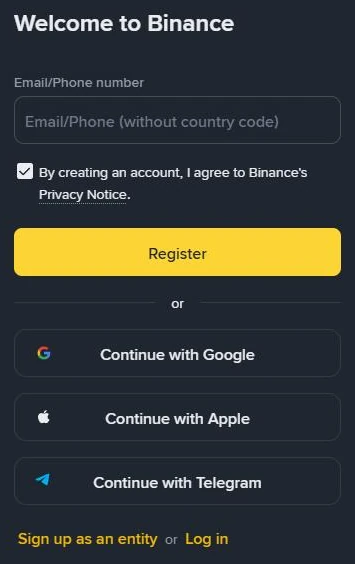
If you’re sure, Binance’s pages cover two possibilities.
The match is wrong. Binance’s privacy portal says its KYC checks use automated decisions, and that “this process isn’t perfect, and sometimes errors can occur”. It goes on, “A classic example is when twin siblings attempt to set up separate accounts. Our system might mistakenly interpret this as one person trying to open two accounts under different names.” The portal’s fix is a manual review:
- Open the Binance app or website and sign in.
- Go to your profile and select the headphone or chat icon.
- Click “View more” in the Self-Service section and scroll down to the KYC section.
- Choose “Appeal KYC Rejection”.
The portal says the request goes to a KYC customer support agent, who reviews the case manually and gets back to you.
Someone used your documents. Binance’s identity page says you can’t “substitute another person’s ID for your ID”, so an account someone else opened with your documents breaks Binance’s own rule. The Binance help pages we read don’t describe a separate way to report this, or say what happens to such an account. The documented ways to reach a person are the same Self-Service appeal and Customer Service chat. Say that you don’t recognise the account, and whether you’ve shared copies of your ID or a selfie with anyone.
We wouldn’t use the ‘Forgot Account’ appeal here, because its video has you say you forgot your own account.
If you sent ID photos to someone who contacted you about verification, check that contact on Binance Verify. Both the ‘Forgot Account’ appeal and “Appeal KYC Rejection” start from Binance’s own app, website or Customer Service chat. More checks are in fake KYC texts and “support” calls.
When to stop: once the appeal has been answered, don’t upload the ID again. Carry on in Customer Service chat with the appeal’s outcome.
Closed a Binance account and signed up again?
First check whether it was closed or only disabled. Binance describes disabling as a way to protect your assets if you notice suspicious activity, and a disabled account can be unlocked. According to Binance’s page on unlocking, a pop-up appears when you log in. Select [Unlock] there and complete the security verifications. Some requests go to review, and the result comes by email. Once it’s unlocked, “please allow up to 48 hours before you are able to withdraw funds or perform Binance P2P transactions.”
If your old account was only disabled, it’s the older account your ID is on, so sign in to it, or find it with the ‘Forgot Account’ appeal.
Closing is final. Binance’s page “How to Close My Binance Account?” (updated 3 September 2026) says “Account closure is irreversible”. The same page explains why your details are still on file. Binance “is legally obliged to retain certain sets of your personal data” after closure, for as long as laws such as anti-money-laundering rules require, or as needed for disputes.
It then warns, “If you create another account after this closure, your identity verification may be blocked for 30 days or longer.” It doesn’t say how much longer, what decides it, or which date the 30 days count from.
- Find the date you closed the old account and the date you opened the new one.
- Wait at least 30 days from the later of the two, the safer date to count from, before trying verification on the new account again.
- Try once. If it’s still refused, contact Customer Service in chat with the closure date instead of trying again.
We read the 30-day figure on the closure page in October 2026. If the page shows a different number when you look, count from that one.
If Binance closed the old account rather than you, the wait may not be the issue. Clause 7.3.1 of its Terms of Use (version effective 21 July 2026) lets it refuse an application where “you have previously had a Binance Account suspended or terminated”, and clause 7.3.2 says it doesn’t have to give reasons. Ask Customer Service.
Signing up again also affects referral codes. The closure page says a new account with a different referral relationship from the old one loses eligibility for referral benefits, and for activities and rewards. Binance’s referral FAQ (updated 5 August 2026) says Binance identifies the duplicate identity. One of its conditions for adding a code after sign-up reads, “The user’s KYC information has not been used on another account within the past 180 days.” The other conditions are in adding a referral code after sign-up.
What won’t clear “ID number has been used”
- A fresh sign-up with a new email or phone number. The ID is the same, and Binance’s answer to a second personal account is a sub-account or an entity account.
- Someone else’s documents, even a relative’s. Binance rules out substituting another person’s ID, and its Terms of Use have individual users promise to use their account “only for yourself, and not on behalf of any third party”.
- A bought account, or a stranger who offers to verify for you. Accounts can’t be transferred to another person, and handing over your ID is how it ends up on an account you never opened.
- Uploading again and again. No Binance page describes repeat uploads as a way past this message.
If your screen shows a different failure message, find the fix for the step that failed, or look it up in the verification message checker.