Fake KYC Texts and "Exchange Support" Calls: Five Checks Before You Reply
Two tests come straight from exchange help centres: a real request is also waiting when you sign in on your own, and real staff don’t want secrets or coins. Fail either one and treat it as fake.
Jump to a section
- Look for the same request inside your account. Close the message and open the exchange’s app, or type its web address yourself. Help pages say a genuine request will be waiting there, and that account issues are handled only through the app or the website. Nothing there, and the message fails.
- Run the sender through the exchange’s own checker. Paste the phone number, email address, link or username into the lookup on the exchange’s own site, where it has one. Reach the checker from that site, not from anything in the message.
- Count what they want from you. Your password, a 2FA code, your recovery phrase and remote access to your phone or computer each appear on at least one exchange’s list of things it never asks for. One such request ends the conversation.
- Treat a texted link to “verify” or “upgrade” your account as the scam. Start any identity check from the exchange’s own app or website instead. Fake upgrade notices and fake verification links are standard spoofed texts.
- Move nothing because a message says your funds are at risk. Two exchanges say they will never ask you to move funds to another address, or to an unknown deposit address, and the notice on one exchange’s contact lookup says the same of funds and tokens requested in private messages.
Fail one check and stop replying. Already answered, tapped the link or sent something? Go to what to do after replying.
Is the same request waiting in your account?
Genuine requests do arrive by email. Kraken’s page names proof of source of funds, bank statements, proof of address and confirmation of details it already holds among the common ones, and says receiving a request “does not mean you have done anything wrong”. Re-checks on accounts that are already verified happen on other exchanges too.
A real request also waits for you inside the account. The same page puts it plainly: “A genuine request will always be visible on your account after you log in. If you were contacted about a request but see nothing on your account, treat the message as suspicious.” It adds that you don’t need the email to start, and that for now these requests show only when you log in through a web browser, not in its app.
So if the app shows nothing, check the website too before you decide.
An exchange page on phishing texts goes further. Account issues, it says, are handled only through the app or the website, so a message that asks you to phone, without confirmation through the app, is a scam.
Get to the website by typing its address, or from a bookmark you made yourself, and never through search engines, emails or social media.
Verification texts are a known pattern. One exchange’s page on SMS spoofing lists “Fake account upgrade notification” and “Fake account verification” among its examples. The second is a text carrying a link to “verify or upgrade” the account, which the page describes as a phishing attempt to steal login details. Open the app or site yourself instead, and start any check from inside the account. The FTC’s consumer advice covers the link itself: “Never click on a link from an unexpected text, email, or social media message, even if it seems to come from a company you know.”
Checking a number, address or account with the exchange’s own tool
Three of the four exchanges in the table describe a lookup on their help pages; the fourth lists its sending addresses instead.
| Exchange | Its checker | What it takes | Where to find it |
|---|---|---|---|
| Binance | A lookup page called Verify | A website, email address, phone number, Telegram or social media account | The website footer, under Support |
| OKX | Channel verification | A group link, a username with “@” in front, a website link, or a phone number with the right country code; for email, only the four address endings its page lists | The “Verify official channels” button at the top of its help article on official accounts |
| Bybit | Authenticity Checker | You pick the channel type and fill in the details | Website: the main menu or the bottom of the page. App: the live chat icon, then the Authenticity Check icon |
| Kraken | None on the help pages we read; a help article lists its sending addresses | Emails, which it says always end in its own domain, subdomains included | Its help centre article on telling its emails apart from phishing, with a form if you’re still unsure |
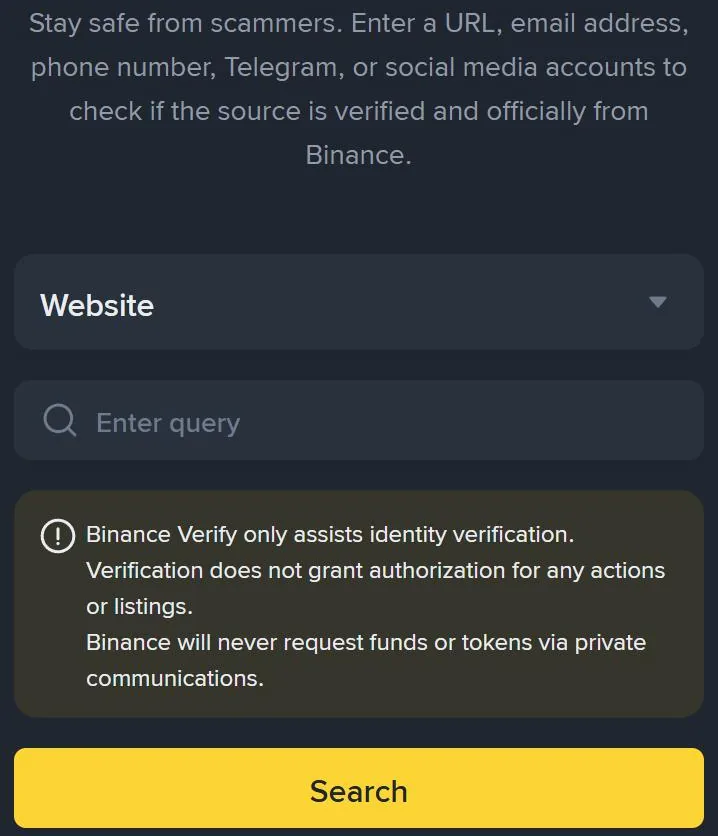
A match means less than it seems. The boxed notice under the Enter query box says “Verification does not grant authorization for any actions or listings.” Sender addresses in emails and texts can be forged, so even an official result doesn’t necessarily mean a message came from the exchange.
We’d count a listed number or address as passing check 2 and nothing more, and still put what it asks for through checks 3 to 5, because those test the request itself.
No match is a clearer answer. OKX lists a username that fails its check as the first sign of a fake admin. The same list also names an account that messages you first, a username with a number in it, and a request for fees or payment, “including listing fee or refundable security deposit”. In instant messaging, its genuine support accounts carry a green “Official” badge next to the nickname.
For an email, look at the full sender address, not the display name. Watch for lookalike domains just one or two letters off the real one. Mail apps that support BIMI, such as Gmail and Outlook, can show an exchange’s logo and a blue checkmark next to its verified emails, and two of the exchanges explain how to read an email’s headers: a “fail” against SPF, DKIM or DMARC means the email did not pass authentication and is likely from an unauthorised source. If you’ve set an anti-phishing code, a genuine email from that exchange carries it. See how the code works, and which texts carry it.
What genuine support never needs from you
Hold the request up against this list, drawn from the exchanges’ own help pages.
- Your password or username. Even the username belongs on this list.
- A 2FA code, from a text or an app. A code that arrives while someone talks you through a fix may confirm what they are doing in your account. One exchange’s page on SMS spoofing gives the case of a user who entered a code on a fake site to “cancel” a withdrawal, when “the 2FA code was intended to confirm a withdrawal request.”
- Your recovery phrase. Two exchanges name it.
- Removing your 2FA, or remote access to your device. One exchange’s never-ask list names both, with remote desktop software such as TeamViewer or AnyDesk as the example.
- Coins or money, to any address. Two exchanges say they won’t ask you to move funds to another address or to an unknown deposit address, and one of them calls any request for a withdrawal by text, phone or email a scam.
The lookup page in the screenshot carries the same line for its own messages:
Binance VerifyBinance will never request funds or tokens via private communications.
The FTC’s advice goes wider: “No legitimate business or government will ever email, text, or message you on social media to ask for money.” It also describes government impersonators who tell people to “solve the problem or protect your money by buying cryptocurrency”.
On a call right now, being told to move coins somewhere safe? End the call. Then open the app yourself and look at your recent activity before you do anything else.
Already replied, clicked or paid: what to do first
Work out what left your hands, then start at that line.
You typed your password into a linked page, or said it aloud. Kraken’s page for this case gives four steps, in this order:
- Secure the device: scan for malware and remove unofficial apps for the exchange. If you downloaded suspicious apps or files, back up what matters and reset the device to factory settings.
- Secure the email account: a new password, and 2FA on the email itself.
- Secure the exchange account: reset the password, set up a new sign-in 2FA, then remove all saved withdrawal addresses and all active sessions and devices. Note down unfamiliar withdrawal addresses and IP addresses first; the page says they are inaccessible afterwards.
- Contact support with what happened and the steps you’ve taken, through the exchange’s own app or website, never through a number or link from the message.
Expect a pause after the reset. At least one exchange stops withdrawals, P2P selling, payment services and internal transfers for 24 hours after a password reset, going by its help centre in October 2026; the hold your app shows is the one that counts.
Each exchange rule quoted here comes from that exchange’s own help centre, as read in October 2026. Among the pages used are the lookup page in the screenshot, the article on telling an exchange’s emails apart from phishing and a page on phishing threats and common scams. The US advice is the FTC’s consumer advice on cryptocurrency and scams.
You read out or typed in a 2FA code. Open the security log, or the account activity list, in the exchange’s app. Fake texts tend to claim a login, a withdrawal or an API link, says one page on phishing texts, so look for any of those you didn’t make. If you find one, work through the four steps for a typed-in password. If your 2FA settings changed and you can’t get past them, how six exchanges reset 2FA when the old method is gone picks up from there.
There’s activity you don’t recognise, and you can still sign in. Lock the account first, if the exchange lets you disable it yourself: look in the security settings, read the notes it shows and complete the security verifications. Getting back in later is a separate request; what unlocks a disabled account covers one exchange’s. Where there’s no disable option, steps 3 and 4 for a typed-in password cover it: close unfamiliar sessions and devices, then contact support.
You sent photos of your ID or a selfie. OKX’s FAQ covers the case where someone used your identity document to verify an account. It tells you to contact support, where you may be asked for a live facial check, a valid ID and why you believe the linked account isn’t yours, and says not to send identity documents in ordinary chat. For what exchanges themselves do with the ID you upload, see what happens to your ID after a KYC upload.
You sent crypto. Report it to the exchange you sent it from, through that exchange’s own app or website; the FTC page lists “the cryptocurrency exchange company you used to send the money” among the places to report. Keep the transaction ID (TXID), screenshots and the messages themselves. Bybit says screenshots and TXIDs help its investigation, and has a separate report for stolen funds that “have flowed into” its platform. The FTC says “Cryptocurrency payments typically are not reversible”, and the same exchange calls losses from deception “often difficult to trace”, so expect a hard road back.
How to report a fake exchange text, email or call
Report it to the exchange the message pretended to be, and keep the message until they answer. Kraken asks you not to delete a suspicious email until it replies. Another exchange wants a phishing email as a saved email file; in Gmail, that’s the three dots at the top right, then Download Message.
- A text. One exchange’s page on phishing texts suggests uploading the SMS to the exchange’s chatbot for a quick check of whether it’s genuine. For texts that ask you to call, its advice is “Ignore it and report it to our customer support team.”
- Any channel. Bybit takes reports on its Authenticity Check page, under phishing threats, scams and other fraudulent activities, or through Live Chat or its web form.
- A fake admin on Telegram or X. OKX asks you to block and report fake Telegram admins to @notoscam, and on X to use More > Block & Report.
Outside the exchange, the only reporting services these pages name are American: the FTC page lists ReportFraud.ftc.gov, alongside other US agencies.
After a fake exchange text or call: the follow-up questions
Does a fake text mean someone is already in my account?
Not necessarily. A fake SMS or call doesn’t by itself mean anyone got in. But a fake that reached you without your anti-phishing code is a sign that someone got some of your details elsewhere, so update credentials such as your password and phone number. Either way, look at recent logins and devices in the app’s security settings.
Why does the fake text sit in the same thread as my real codes?
Because the sender name can be faked. Fraudsters use specialised software to change the sender ID, and Binance’s page on SMS spoofing says the fake then lands in the same thread as its official messages, 2FA codes included. The sender name on your phone proves nothing about who sent the text.
Someone offers to get my verification approved for a fee. Is that a real service?
No. Identity checks are done with your own document and your own face: one exchange’s FAQ says verification must be completed with the account holder’s own valid identity document and facial verification, and its list of signs of a fake admin includes a request for fees or payment. If your own check failed, retry it yourself from the exchange’s own app or website.
What makes the next fake easier to spot?
Three habits from the exchanges’ own pages: set an anti-phishing code, so genuine emails carry a code you chose; turn on more than one 2FA method, passkeys included, which one help centre calls phishing-resistant; and keep an email address for that exchange and nothing else, which the same help centre also suggests.