Exchange Verification Code Not Received? Email and SMS Checks in Order
Find where the code went before asking again: email codes hide in spam, junk or another inbox, and texts fail on coverage, signal or a blocked sender. Help centres also want a gap between requests.
Jump to a section
“I’ve asked for the code three times. Nothing in my inbox, nothing on my phone. What now?”
Email: search every folder, spam and junk included, for the exchange’s name or sender address. Then make sure you’re signed in to the inbox you actually typed.
Text message: check that the exchange sends SMS codes to your country at all. Then look at the phone for signal, a full message inbox or an app that blocks texts.
Authenticator app: if that’s what the box asks for, nothing is on its way. Open the app; it makes the code on the phone.
Email code: search, then whitelist the sender
Use the search box. Help pages suggest searching your mail folders for the exchange’s sending address, its name, or “Verification”. All five exchanges’ email pages name the spam or junk folder, and the trash is worth a look too, because an email provider may delete the code email itself. If the code is in either place, mark it as safe and whitelist the sender addresses, copying them from the exchange’s help centre and never from a message. One help centre lists four sender addresses, then says to wait 10 minutes before asking for a new code.
Nothing in spam? Check the inbox itself: are you logged in to the address registered to the account, and is that address right? At sign-up, one wrong letter sends the code somewhere else. An unconfirmed new account can also expire (one exchange gives two hours to confirm it), and the fix for a mistyped address is then to create the account again, spelled correctly.
Then what stops mail before it lands:
- A full inbox. Two exchanges list it; a mailbox at its limit can’t receive anything new.
- Filters and block lists. A filter setting that catches the message, or the exchange’s domain on your block list.
- The provider. Help pages suggest asking your provider to stop suppressing the exchange’s emails, or registering with an address on a common domain such as Gmail or Outlook.
- Where you asked from. Pages suggest a private browser window, another browser, or the latest version of the app. If the code was for a sign-up, reopen the same sign-up link you started from rather than starting again in the app, so a referral link’s code stays filled in.
- The connection. Reading mail on your phone? A help page suggests switching from Wi-Fi to mobile data, or from 5G to 4G.
Signed up with Apple? With Hide My Email, the address on the account is one Apple generated, and exchange help pages warn that your emails may be forwarded to the Apple ID you signed up with, not to the address shown on your profile. On your Apple device, check that the Apple address forwards to your inbox, under Settings > iCloud > Hide My Email > Forward to.
SMS code not received: coverage, the phone, the carrier
The first check is on the exchange’s side, because SMS codes don’t necessarily reach every country. Binance, for one, publishes a list of countries supported for SMS verification; where yours is missing, its SMS page says to use “passkeys, BAuthenticator, or Google Authenticator as your primary 2FA”.
Look in WhatsApp too, because the code may have gone there instead; WhatsApp codes have checks of their own.
Then check the number you typed, digit by digit, in the format the field asks for.
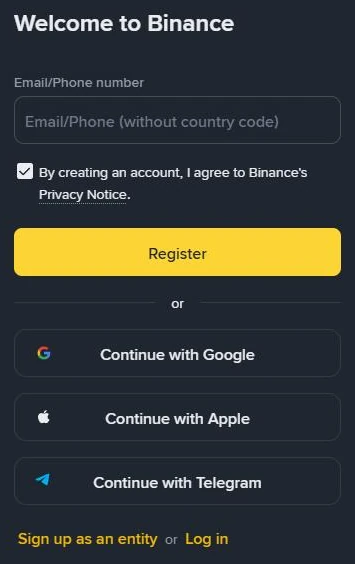
If it’s wrong, go back and enter it again; once the account exists, correct it in account settings and request a new code.
The phone checks, in the order we’d do them:
- Signal, then a restart.
- A full SMS inbox, which stops any other text from arriving.
- Anything that filters texts: security, anti-virus, firewall or call-blocking apps, and Do Not Disturb.
- Dual SIM: swap the card to the other slot, or try it in another phone.
If the phone is fine, ask the carrier whether the message was delivered and whether your plan has been stopped or suspended; two exchanges suggest one or the other. If you switched carrier and kept your number, delivery problems may follow; tell the exchange’s support.
Still nothing? Change the channel before you change the number.
The SMS page that points to the country list suggests voice verification, and OKX offers an authenticator app, a voice call, Telegram or WhatsApp through Log in > Forgot your password > Unable to verify. We’d try these first, because changing the number pauses withdrawals afterwards (how long, and what else a new number involves). Reset the number only when no channel works, and contact support if the reset fails too, with your UID to hand.
Sign up with a number you’ll keep. Sites selling temporary or virtual numbers for one code are not a fix. SMS codes go to the mobile phone linked to the account, and authenticator recovery can send a code to the registered email address and mobile number as well. If the number isn’t yours to keep, those codes go to whoever holds it next. Rather not give a number? The sign-up field in the screenshot takes an email address too.
Codes by WhatsApp, voice call or another app
If the code screen mentions WhatsApp, the text-message checks only go so far. Bybit’s mobile-code page says codes may arrive “via SMS or WhatsApp, depending on system conditions and delivery success”. The channel you choose at your first security verification can’t be changed afterwards. Once a WhatsApp code has been delivered and verified, later codes go to WhatsApp first, but when one can’t be delivered, the page says it’s sent by SMS instead. So look in your texts as well.
Its WhatsApp checks start with the connection, since WhatsApp “requires an active network connection”.
- Wi-Fi or mobile data that stays connected.
- The phone number on the exchange account, registered on WhatsApp itself.
- WhatsApp notifications switched on and not muted on the phone.
- WhatsApp sending and receiving other messages normally.
- A restart, or reinstalling WhatsApp if needed.
After that, the page points to its request form.
Which channels you’re offered can depend on where you are: besides SMS and voice messages, codes may come through internet-based messaging services in selected countries or regions. Choose from the methods displayed on the exchange’s own code screen. A voice code is a call you asked for; an unexpected call that wants a code read back is a case for the checks on unexpected calls and texts.
Waiting for a 2FA code? Authenticator codes are never sent
A code from an authenticator app isn’t sent anywhere. Google’s help page says its app can “still generate codes without an internet connection or mobile service”, so waiting, or checking your texts, won’t produce one. Exchange help pages deal with authenticator errors separately from SMS and email codes; for a failing authenticator code, one suggestion is to verify with another 2FA method you’ve set up, such as a passkey, SMS or email.
If the app shows a code and the exchange refuses it, look at the phone’s clock. Google’s checklist wants the time on your device “synced and correct for your local time zone”, so switch the phone’s time setting from Manual to Automatic.
Authenticator on a phone you no longer have? That isn’t a delivery problem. Moving 2FA to a new phone, or getting past a lost one compares six exchanges’ resets.
No code abroad, on a new SIM or with a new number?
Abroad, start with roaming. One SMS help page lists roaming network conditions among the things that may disrupt delivery, and asks you to make sure the phone is connected to a local network. It also names the balance on your mobile account, since some carriers charge for incoming international SMS; top up before you ask again.
The same page’s longer-term tip is to set up Google Authenticator or email verification as a backup to SMS. We’d do that before a trip rather than during one, because an authenticator makes its codes on the phone itself, signal or no signal.
None of these help centres deals with a replacement SIM on the same number, so start with the phone checks for texts. If texts stopped after a SIM change you didn’t make, go straight to the SIM-swap warning.
Moving to a new number? Make the change while the old SIM, or another 2FA method, still works, because the reset can ask for 2FA before you enter the new number and then send a code to it. If the old number is gone for good, Bybit’s way in is the security verification pop-up at log-in. Choose Having problems with verification, then the option beginning “Mobile number authentication via (your registered mobile number) isn’t working.”
Expect a pause afterwards. Withdrawals stop for 24 hours on most of the exchanges here, or for up to 48 hours on one, and P2P trading and internal transfers can stop with them. Use a number that’s free, too: a number already registered to another account on the platform may be refused.
How long to wait, and when to stop asking
| Exchange | Wait before asking again | Resends | How long a code or link lasts | Too many requests or wrong codes |
|---|---|---|---|---|
| Binance | 10 minutes when no code has come | Not stated | 30 minutes to enter the sign-up code | Requesting too often in a short time may get the account locked |
| Bybit | 15 minutes after an email timeout | Not stated | Not stated | Too many email requests in a short time cause a timeout |
| OKX | About 2 hours after “SMS sending failed”; 1 hour after an email code fails to send | Not stated | 10 minutes for each SMS code | Six wrong codes within a period of time lock the account |
| Bitget | 120 seconds between resends; 15 minutes after too many email requests; a few minutes after three SMS resends | Up to 3, each one possibly sent by a different SMS provider | Not stated | Too many email requests in a short time cause a timeout |
| Kraken | Until the emailed link has expired | Not stated | 2 hours to confirm a new account or use a password-reset link (once only); 20 minutes to approve a new device; 24 hours to confirm an email change | Several password-reset requests in a short time may lock resets for a while; wait at least 2 hours |
“Not stated” means the pages give no figure, not that there’s no limit. The figures date from October 2026, and your own code screen beats this table if the two disagree.
A code that turns up late may be past its window, whether it came by text or it’s the code you type while creating an account. Ask for a fresh one when the wait allows, instead of trying older codes in turn, since wrong entries can count towards a lock.
Binance’s code-error page names this message:
On screenSend code failed. Please click 'Get Code' again.
For it, the page suggests asking from another device (a browser on a computer instead of the app, for example) or from another network, such as a different Wi-Fi or mobile data instead of Wi-Fi. For “Wrong code” it suggests a new code with [Get Code], but not too often.
The same page lists one more message.
On screenWe could not process your request. Please try again later.
Here too it suggests another Wi-Fi network, mobile data or another device, and it adds clearing the browser’s cache and cookies, or opening the website in incognito mode. Another exchange’s app may show “System Busy” instead; its page points back to the same delivery checks.
Once you’ve run the checks for your channel and sat through one full wait, stop requesting and contact support.
For a missing email code, one help centre lists what to include: your app version number after updating, a screenshot of the code countdown on the screen, the email address that isn’t receiving the code, and the time you asked for it.
A verification code you didn’t request, or someone asking for yours
Don’t read a verification code out to anyone, whoever they say they are. Kraken says it will never ask you for your password, 2FA codes or recovery phrase, and a page on phishing texts calls any message that asks you to call, without confirmation through the app, a scam. Before you answer a call or text like that, run five checks on “exchange support” contacts.
A code arrives that you didn’t request? Don’t use it, and open the account in the app or on the website, not through a link in the message. Then check the security log, or the list of recent account activity, for anything you didn’t do. The same page on phishing texts says a fake SMS or call “does not necessarily mean” your account was hacked; the log is where you’d see it if it was.
An anti-phishing code helps you tell real messages from fakes. You choose it yourself, and genuine emails from the exchange then carry it; a message where it’s wrong or missing may be a phishing attempt and should be reported.
Texts are patchier. Binance puts the code at the very end of “certain SMS messages sent to users in selected countries”, so we’d give a missing code in an email more weight than a missing code in a text.
To check a number, address or account that contacted you, use the exchange’s own checker where it has one, not the details in the message. Even then, a match proves less than it seems. Binance Verify, for one, warns that verification “does not grant authorization for any actions or listings”, so a match tells you a contact is listed as official, and nothing about what it asks you to do.
If texts stop arriving from everyone, not only the exchange, think about the SIM itself. The FBI’s public warning on SIM swapping describes criminals getting a mobile carrier to move a victim’s number to a SIM they hold, after which “the victim’s calls, texts, and other data are diverted”, one-time passcodes included. It recommends methods such as standalone authentication apps or physical security tokens, and where an exchange offers them, we’d keep SMS as a backup rather than the only way in.
The FBI’s advice also includes being “aware of any changes in SMS-based connectivity”. If you suspect a swap, it says to contact the mobile carrier immediately to regain control of the number.
More on codes, and the phone number behind them
Is there a normal delivery time for a code?
Not a firm one. The pages we read say no more than that most emails arrive within a few minutes, or that codes may take some time to arrive.
Why is a code for a withdrawal rejected as incorrect?
OKX’s page says this can happen when the code has been requested too many times in a short period. Its advice is to wait a moment and try again and, if you’re in the app, to switch to the website. If that doesn’t help, contact customer support.
Can I take my phone number off the account altogether?
Not everywhere. Bybit lets you change your registered mobile number to a new one, but says removing a number “is not supported yet”. Another exchange’s SMS help page mentions unlinking a phone number as well as changing it, with withdrawals and P2P trading paused for 24 hours after either.
Where each check comes from (pages read in October 2026)
- OKX
- Help page on verification codes that don’t arrive, by SMS, voice, messaging app or email — SMS checks, the 10-minute validity, the lock after six wrong codes, the wait after ‘SMS sending failed’, codes through internet-based messaging services in selected countries, other methods via Unable to verify, the 24-hour pause after a phone number is changed or unlinked, the email whitelist, the 1-hour wait and what to send support, the incorrect withdrawal code, ‘System Busy’; published 16 Aug 2023, updated 26 Aug 2026
- Binance
- Help-centre pages on 2FA code errors, SMS codes and the countries they reach, email delivery, the sign-up code, phone-number resets, anti-phishing codes, phishing texts and checking an official contact — code errors published 10 December 2024, SMS codes and email delivery 5 January 2018, none with an update date; sign-up updated 24 November 2025; the SMS country list 24 February 2026; phone-number reset 11 March 2026; anti-phishing code 28 August 2026; phishing texts 7 February 2026; the contact checker undated
- Bybit
- Help-centre pages on email and mobile codes that don’t arrive, self-service changes, account settings, on-chain withdrawals and authenticator recovery — spam, whitelisting, Hide My Email and the 15-minute timeout (last updated 30 September 2026); SMS or WhatsApp delivery and the request form (6 May 2026); changing a number that isn’t working (23 January 2026); a number can be changed but not yet removed (25 November 2025); the 24-hour withdrawal restriction (12 April 2026); codes for authenticator recovery (23 August 2026)
- Bitget
- Help-centre pages on verification emails and SMS that don’t arrive, and on resetting a phone number — resending every 120 seconds up to 3 times, the switch from Wi-Fi to mobile data, the waits, most emails arriving within a few minutes (published 22 January 2025); signal, roaming, the balance for incoming international SMS, an authenticator or email as a backup (17 January 2025); one account per phone number and the 24-hour pause (23 January 2025)
- Kraken
- Support pages on email delivery, signing in, authenticator codes and requests for more information — whitelisting, the block list and link expiry times (last updated 10 December 2025); reset links, device approval and the reset lock (13 April 2026); the phone’s time setting (31 March 2025); what it will never ask you for (1 October 2026)
- FBI IC3
- Criminals Increasing SIM Swap Schemes to Steal Millions of Dollars from US Public — public service announcement I-020822-PSA: how a SIM swap diverts texts and one-time passcodes, and the FBI's advice; 8 February 2022
- Get verification codes with Google Authenticator — Google Account Help: codes generated without an internet connection or mobile service, and the device time check for refused codes; no date shown