How to Create a Binance Account Step by Step: Every Screen, Including the Referral Code
Start on Binance’s sign-up page in a browser and add the app afterwards. The 6-digit code comes before the password, and the referral code screen appears only once the account exists.
Jump to a section
The screens, in order: email or phone number → the terms box and [Next] → a 6-digit code, entered within 30 minutes → a password → the referral code screen → identity verification. On a computer or a phone, it starts in the browser, on Binance’s sign-up page.
For an email or phone sign-up, start by typing your email address or phone number into the single field on the first screen, then press the yellow button under it. The sign-up page itself labels that button Register, while Binance’s help pages call it [Sign Up]. It is the same button. Names in square brackets are the help pages’ own wording.
Step 1: Open the sign-up page in a browser
The website and the app lead to the same account, and the help pages offer email, phone number, Google, Apple and Telegram sign-up on each.
- On a computer or in a phone browser, open Binance’s sign-up page. That is this site’s Binance referral link: signing up through it does not raise your fees, it gives up to 20%* off trading fees, and this site may earn a commission. The referral programme excludes some countries and regions (see the referral disclosure). Crypto assets are high-risk and you can lose all the money you put in. *It applies to spot and futures trading fees; the rate is the one Binance shows and may change.
- Want the app as well? Install it once the account exists and log in with the email or phone number and password you registered. Already started in the app instead? Carry on there: the screens come in the same order, and the referral code box appears at Step 5, where this site’s code is.
Started in the app? What differs
| Screen | Website | App |
|---|---|---|
| Code and password | The 6-digit code within 30 minutes, then the password | The same order |
| Referral code | After the account is created | The same, after the account is created |
| After the last [Next] | “you must complete identity verification before trading” | “you’ll be redirected to complete identity verification” |
Step 2: Choose email, phone, Google, Apple or Telegram
The first screen is short. It says “Welcome to Binance” and has one field, labelled “Email/Phone number”. Under it is the agreement line, ticked in the screenshot, then the yellow Register button. Below that come Continue with Google, Continue with Apple and Continue with Telegram. At the very bottom sits “Sign up as an entity or Log in”. That entity link is the way in for a company, and it has to be chosen now: both help pages say “Please select the type of account carefully. Once registered, you cannot change the account type.” Binance’s entity verification guide adds that an email already linked to a personal account can’t be upgraded to an entity account, so a company needs an email address of its own.
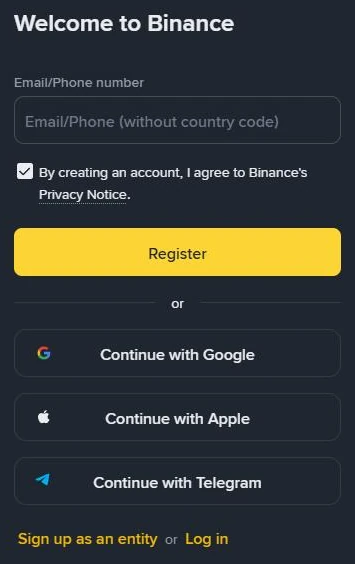
Binance sign-up pageBy creating an account, I agree to Binance's Privacy Notice.
There is no country menu on this screen and no password box. Binance’s written sign-up steps don’t ask for your country. You pick it on the first identity verification screen, as Residence, once the account exists (Step 6).
The method you pick decides where codes go and how you get back in later, so give it a minute.
Email address
Codes arrive in your inbox. Binance’s page on missing emails recommends “email addresses from common domains, such as Gmail, Outlook, etc.” Use an address you expect to keep for years. Binance keeps writing to that address after sign-up, and changing it later pauses withdrawals for a while.
Phone number
The field’s hint reads “Email/Phone (without country code)”, so type the number without the international prefix. Codes come by text message.
Text messages don’t reach everywhere. Binance’s SMS page says some countries and regions aren’t supported and points to its global SMS coverage list. If your country isn’t covered, the page says to “use passkeys, BAuthenticator, or Google Authenticator as your primary 2FA”. Set one of those up straight after sign-up.
Don’t sign up with a temporary, rented or virtual number. The number becomes one of the ways Binance confirms it’s you, and you can’t get back a number you rented for a single code. Lose access to it and you go through Binance’s 2FA reset. Its help page describes a manual review of up to 24 hours in some cases, and withdrawals switched off for up to 48 hours after the reset. Resetting Binance 2FA after losing a phone or number covers that process in full.
Google or Apple account
Press Continue with Google or Continue with Apple, sign in to that account in the pop-up, then agree to the Terms of Service and Privacy Policy with [Confirm]. Back on Binance, confirm once more with [Next]. The help page’s steps for this method have no code screen and no password screen. The account is created straight away, and the referral code screen follows.
Apple’s Hide My Email option needs care. Binance’s code-error page says that if your account was created with an Apple ID using Hide My Email, “your emails may be forwarded to the Apple ID you used to sign up and not the email address shown on your profile.” If codes seem to vanish later, look in that Apple ID inbox. To use another address, unlink the Apple ID on Binance’s security page; the help page says you can then add a different email address.
Telegram
Press Continue with Telegram, then [Connect], and log in to Telegram. Telegram sends you a confirmation; press [Confirm] there. Binance then asks whether to [Create a new Binance Account] or [Link an existing Binance Account].
If you already have a Binance account, choose the link option; the help page says it skips the remaining steps. A new account still needs an email address or phone number. You enter one, agree to the terms, press [Next], type the one-time code (OTP) sent to it, and press [Next] again. The help page then adds, “You can bind your referral code at this step if applicable.”
Step 3: Agree to the terms, then enter the 6-digit code
In the help page, the screen after the email field repeats your email address or phone number, asks you to “Read and agree to the Terms of Service and Privacy Policy”, and has a box to tick before [Next]. The sign-up page itself already shows a ticked Privacy Notice line on the first screen. If a separate terms box does appear after you press the button, tick it and press [Next].
Binance’s Terms of Use, which govern registering an account, also set the age and location rules in who can open an account.
A puzzle may appear at this point. Binance’s sign-up help pages don’t mention one, so there is no official wording for it. Follow its own prompt.
Next comes the code screen. In the help page’s words, “You’ll receive a 6-digit verification code in your email or phone. Enter the code within 30 minutes and click [Submit].” In the app you tap rather than click. The 30 minutes is the window; if you leave the screen and come back much later, ask for a new code instead of typing an old one.
If the code doesn’t arrive
Wait before you press resend, because Binance’s code-error page warns “do not operate too frequently in a short period of time or your account might be locked.” It suggests trying again in 10 minutes, and says high network traffic can delay codes sent by email or SMS.
Then work through the checks for the channel you used. For an emailed code, Binance’s missing-email page lists six:
- You are logged in to the inbox you typed on the sign-up screen.
- The address itself is right. One wrong letter sends the code somewhere else; if it’s wrong, go back and start again with the correct one.
- The spam folder. Mark Binance’s messages as safe so the next one lands in the inbox.
- Your email app or provider is working, and no firewall or antivirus is blocking the message.
- The inbox isn’t full. A full mailbox can’t receive anything.
- The provider. Binance recommends common ones, such as Gmail or Outlook.
For a text message, Binance’s SMS page lists a good network signal, turning off anti-virus, firewall or call-blocking apps that might stop texts from Binance’s SMS number, restarting the phone, and trying voice verification instead. If texts never come at all, check the SMS coverage list from Step 2.
Still nothing after those checks and a 10-minute wait? Stop requesting codes and contact Binance Support through its help centre instead. Email and SMS checks for a verification code that never arrives covers the same problem across exchanges, check by check.
A code that arrives but is refused shows a message instead, and the first one Binance’s code-error page lists is short.
On screenWrong code
The fixes for it, and for the two other messages that page names, are in what to do when sign-up stops.
Step 4: Set a password Binance will accept
Sign-ups through Google, Apple or Telegram have no password screen in the help pages’ steps, so this one is for email and phone.
The help page gives the whole rule in one sentence, “Your password must contain at least 8 characters, with at least one uppercase letter and one number.” Nothing in it asks for a symbol. Type the password, then press [Next].
Make it longer than eight characters and use it nowhere else. A password manager is the easiest way to get one that is long and unique, and it saves typing it on a small screen.
Getting it right now also saves a wait later. Binance’s withdrawal page says that after certain security operations, “such as changing your password”, the withdrawal function is temporarily suspended for 24 to 48 hours. It adds that “the suspension cannot be lifted before the suspension period ends.”
Step 5: Where to enter the referral code
The account exists once this message appears:
Binance sign-upCongratulations! You have successfully created a Binance account.
The same screen holds the referral code. The help pages describe four situations:
- You arrived through a referral link. The help page says “the referral code should be automatically filled and you’ll see a green tick and [Linked] next to it.” There is nothing to type; press [Next].
- The box is empty and you have a code. Type it in, check every character, then press [Next].
- The code shows as invalid. “If the code is invalid, you may edit it or enter another one.”
- Nobody gave you a code. You can use this site’s, shown at the end of this step.
Whichever applies, the help pages add that “once a referral code is linked to your account, it cannot be modified.”
Check the code before you press [Next].
Binance’s help pages don’t print the label beside the box, so look for the box on the screen that opens with “Congratulations!”. If you’d like to use this site’s code, copy it here and paste it into that box when it isn’t already filled.
Binance referral code
ZY1818Enter it in the referral code box when you sign up and you get a discount of up to 20%* on trading fees.
*Binance sets the rate and can change it; your account shows the one that applies to you. It covers spot and futures trading fees. Using this code does not make you pay more. The referral programme is not available everywhere — the referral disclosure names the Binance page that lists the excluded regions.
Skipped it, or pressed [Next] too quickly?
Binance gives a second chance, with conditions. Its Referral Pro FAQ says a referral can still be bound after registration when all six of these are true:
- the account’s identity verification (KYC) information hasn’t been used on another account in the past 180 days;
- the account has no referral relationship yet;
- it is a parent account, not a sub-account;
- you are within 30 days of registering;
- there has been no deposit or trading on the account;
- the account isn’t flagged as a wash trader.
The six are as the FAQ, updated on 5 August 2026, listed them when we checked it in October 2026. The 30-day window and the conditions can change, so read the FAQ’s current wording before you count on them.
Once a referral relationship is set up, the same FAQ says, it can’t be changed or removed. Adding a Binance referral code after sign-up, step by step walks through the binding screen and what happens when one of the six isn’t met.
Step 6: Identity verification starts straight away
Press [Next] on the referral screen and the app takes you on “to complete identity verification”. The website help page puts it as “you must complete identity verification before trading.” Binance’s identity page adds that every new user has to complete [Verified] to use its products, deposits and trades included.
If you stop here and come back later, the way in is:
- Website: hover over the profile icon, click [Account], go to [Identification], then [Get Verified]. Homepage banners also show [Verify] or [Get verified].
- App: [Verify Now] on the home screen, or the account centre icon and then [Unverified].
The check itself, in the order Binance’s page How to Complete Identity Verification for a Personal Account? (updated 5 June 2026) gives it:
- Choose Residence, Document Issuing Country/Region and Document Type. This is where your country is set. Most users can pick a passport, ID card or driving licence; the options depend on the country.
- Upload the document from the device you’re on, or scan a QR code to carry on with your phone. Whether manual upload is offered depends on the country.
- Upload the front and the back of an ID card, then press [Continue].
- For the Liveness Check, allow camera access, take off hats and glasses, turn off filters, and find good light. The app version adds that your whole face should be clearly visible, centred, with your eyes open.
- Confirm your personal details and press [Continue]. They must match your document, because the page warns “You won’t be able to change it once confirmed.”
Don’t refresh the browser while the check runs. In the app, don’t refresh or quit it.
On timing, the same page says: “Submitted documents are usually reviewed within 48 hours. However, it may take longer in some particular cases.” Binance sends a notification once the application is verified.
Your verification level shows on the [Identification] page, and it sets your account’s limits. Binance’s help page doesn’t print limit figures; it points to that page for the current ones. How verification levels work across exchanges, and what each level opens up explains the idea behind the levels.
If the check comes back rejected, Binance verification failed? Fixes for each message starts from the exact message on your screen.
Secure your new Binance account: 2FA, a passkey and an anti-phishing code
The registration help pages close with “To protect your account, we highly recommend enabling at least 1 two-factor authentication (2FA).” Do it before anything goes into the account.
Add a passkey or an authenticator app
In the words of Binance’s passkey page, “Once you’ve added a passkey, you can use it for Two-factor Authentication (2FA) on all your linked devices.” The passkey can use your phone’s screen lock or PIN, iCloud Keychain, Google Password Manager, a USB security key, or another device.
In the app, the feature needs Binance app 2.60 or later, on iOS 16 or later or Android 9 or later, according to the passkey page (updated 10 December 2025).
- Go to [Account Center], tap the profile section at the top, and go to [Security].
- Tap [Passkeys (Biometrics)], then [Add Passkey]. You may be asked to verify with an existing passkey or 2FA method first.
- Confirm the email shown is your Binance account’s, tap [Continue], and choose how to create the passkey.
On the website, open a supported browser such as the latest Chrome, hover over [Profile], click [Account] and go to [Security]. There, click [Manage] next to [Passkeys (Biometrics)], then [Add Passkey]. A passkey saved to your Chrome profile “will only be saved on this device”. The page recommends saving it to Google Password Manager instead, because it then syncs with your Google account.
If you’d rather use an authenticator app, Binance’s SMS page names BAuthenticator and Google Authenticator as the alternatives to SMS.
Set an anti-phishing code
According to Binance’s anti-phishing page (updated 28 August 2026), “Once you’ve enabled the anti-phishing code, it will be included in all genuine e-mails and SMS from Binance.” A message that claims to be from Binance but shows a wrong or missing code “may be a phishing attempt and should be reported immediately”.
The page sets these rules for the code, and suggests one that is hard to guess but easy for you to recognise:
- “Be between 6 to 8 characters”
- “Include at least three of the following character types: uppercase letters, lowercase letters, digits, and underscores.”
- “Code cannot contain any special character.”
In the app and on the website alike, you confirm with 2FA or a passkey before the code is saved, so set the passkey up first.
- App: open the menu, tap your profile to reach Account Info, select [Security], then [Anti-Phishing Code] and [Create]. Type the code, tap [Submit], and confirm with 2FA or a passkey.
- Website: hover over [Profile], click [Account], go to [Security], scroll to [Advanced Security] and click [Enable] next to Anti-Phishing Code. Click [Create], enter the code, click [Submit], then confirm with your 2FA.
Sign-up stopped? Find what your screen shows
Find the row that matches your screen. The middle column says what to try, and the last one says when to stop trying and ask Binance Support.
| What you see | What to do | Stop and ask Binance Support when |
|---|---|---|
| No code in your inbox or texts | Wait 10 minutes, then run the email or SMS checks in Step 3. With Apple’s Hide My Email, look in the Apple ID inbox. | The checks are done and still nothing arrives. Don’t keep pressing resend: Binance warns that frequent requests can lock the account. |
| “Wrong code” | Request a new code with [Get Code] and type the newest one, within 30 minutes. Binance’s code-error page also suggests a different device or browser, or a different network. | A fresh code is refused on a different device and network too. |
| “We could not process your request. Please try again later.” | Switch between Wi-Fi and mobile data, clear the browser’s cache and cookies, open the sign-up page from Step 1 in an incognito window, or use a different device. | It still appears after all four. |
| “Send code failed. Please click ‘Get Code’ again.” | Ask for the code from another device (a browser on a computer or phone instead of the app) and on another network. | It keeps failing on another device and network. |
| Sign-up won’t take your email or phone because an account already uses it | You already have an account. Log in instead, and use [Forgot password?] at the password step if you need to. If you can’t remember which email or phone you used, Binance’s help page sends you to its ‘Forgot Account’ appeal; for an account not yet verified, the link also shows on the ‘Need help to login?’ page after a failed login. | Once the appeal is in, wait for it: Binance’s page says review is typically within 1 working day, weekends excluded. Don’t open a second account with another email in the meantime. |
| At identity verification, a message that your ID number has already been used | The document is on another Binance account, perhaps one you forgot. Read what to do when Binance says your ID number has been used. | Don’t submit someone else’s document instead: Binance’s identity page says you can’t substitute another person’s ID for yours. |
| Your country isn’t offered, or Binance won’t open where you are | Check Binance’s List of Prohibited Countries, a page in its legal section. If you live somewhere on it, the Terms of Use rule out an account. | Stop here. Clause 25.5 forbids getting round the restriction “including by use of any virtual private network to modify your internet protocol address”. |
| You’re under 18 | The Terms of Use require you to be at least 18, or the age of majority where you live if that is higher. | Stop. Signing up with a parent’s or anyone else’s details breaks the rule that an account is used only by the person it belongs to. |
| The referral code shows as invalid | Check each character and edit it, or enter another, such as this site’s code in Step 5. | No need to contact Support. Once a code shows [Linked], the help pages say it can’t be modified. |
| You chose Telegram but already had a Binance account | Pick [Link an existing Binance Account] instead of creating a new one. | Telegram is already tied to an account you no longer use. The sign-up help pages don’t cover changing that, so ask Support rather than opening another account. |
| You registered as personal but need a company account | The account type can’t be changed after registration. Register the company with an email that isn’t linked to a personal account. | Retrying won’t change it: both help pages say the type is fixed once registered, and the entity guide says an email linked to a personal account can’t be upgraded to an entity account. |
| A puzzle that keeps failing | Reload the sign-up page and try again, or open the sign-up link from Step 1 in another browser or on another device. Binance’s sign-up pages don’t mention the puzzle, so there is no official fix. | It fails in a second browser and on a second device too. |
Who can open a Binance account
Three conditions in Binance’s Terms of Use, in the version effective 21 July 2026, matter at sign-up.
Age. Clause 2.1(b) says that to be eligible you must, “if you are an individual, be at least 18 years old and be legally allowed in your jurisdiction to enter into binding contracts”. A later clause in the same terms has you confirm that you are “at least 18 years old (or the age of majority in your jurisdiction of residence, whichever is greater)”. Where adulthood starts later than 18, the later age applies.
Where you live. Clause 2.1(f) rules out anyone located in, resident of or operating in (and, where it applies, a citizen of) a jurisdiction on Binance’s List of Prohibited Countries, or one where using Binance would be illegal. The list is Binance’s own and changes over time, so go by its current version rather than anyone’s summary. Clause 25.5 adds that if you travel to a listed location, Binance services may not be available and access “may be blocked”.
One person, their own documents. Clause 7.4.1 says an individual uses the account “only for yourself, and not on behalf of any third party”, unless Binance agrees in writing first. Clause 25.1(b)(iii) lists “more than one natural person” using the same account as grounds for suspending or closing it. Binance’s identity page also says, “You cannot transfer your account to another person or substitute another person’s ID for your ID.”
Binance can also turn an application down. Clause 7.3.1 gives examples, including when it can’t verify your identity, and clause 7.3.2 says it doesn’t have to give a reason.
Buying or renting an account someone else verified runs into clauses 7.4.1 and 25.1(b)(iii), and so does paying someone to pass the identity check for you. Either way a second person stands behind an account that belongs to the first, which is exactly what those clauses describe.
KYC, email changes, second accounts and Binance.US
Is KYC required to use Binance?
Yes. Binance’s identity page says every new user has to complete [Verified] to use its products, deposits and trades included, and the website help page puts it as “you must complete identity verification before trading.” The check opens straight after the referral code screen. If you leave it for later, [Account] → [Identification] → [Get Verified] on the website, or [Verify Now] in the app, takes you back to it.
Can I change the email address after signing up?
Yes. Binance’s page How to Change My Binance Account Email? (updated 14 October 2026) puts it under Security, with Manage next to Email. After the change, withdrawals, internal transfers and P2P transactions are disabled for up to 24 hours, and the old address can’t be used to register again for 30 days.
Can one person have two Binance accounts?
Binance’s identity verification page answers this for verified personal accounts: if you already have one, you can open a separate entity account, or use sub-accounts, up to five under your personal account. The Terms of Use also let Binance limit how many accounts are created from one device (clause 33.12). Closing an account and starting again is not a reset either: Binance’s account-closure page says that if you create another account after closing one, your identity verification may be blocked for 30 days or longer.
Is Binance.US the same company as Binance?
No. The Binance.US Terms of Use (last updated 5 June 2026) say its services are provided by BAM Trading Services Inc., and that BAM Trading and Binance Holdings Limited share common majority ownership but are not within the same corporate or management structure. Binance.US has its own help centre and its own terms, so its sign-up steps and rules don’t describe a binance.com account, and the reverse is true too.
Help pages and terms behind each step, read in October 2026
- Binance help centre
- How to Register on the Binance Website? — updated 24 November 2025 (screen order, button names, referral code screen)
- How to Register on the Binance App? — updated 24 November 2025 (app screens and the referral code screen)
- How to Complete Identity Verification for a Personal Account? — updated 5 June 2026 (verification steps, 48-hour review wording)
- Frequently Asked Questions on Binance Referral Pro Mode — updated 5 August 2026 (adding a code after sign-up, questions 4 and 6)
- Why Can't I Receive SMS Verification Codes? and Why Can't I Receive Emails from Binance? — both published 5 January 2018, no update date shown
- How to Resolve 2FA Code Error for My Binance Account? — published 10 December 2024 (code error messages, Hide My Email)
- How to Create a Passkey for My Binance Account? — updated 10 December 2025
- What Is an Anti-Phishing Code and How to Set It up on Binance? — updated 28 August 2026
- How to Reset 2FA When I Can't Access My Binance Account? and How to Reactivate the Withdrawal Function for My Binance Account? — updated 18 March 2026 and published 8 January 2020
- How to Complete Entity Verification: A Step-by-Step Guide and How to Appeal for 'Forgot Account' on Binance? — updated 21 July 2026 and 26 January 2026
- How to Change My Binance Account Email? and How to Close My Binance Account? — updated 14 October 2026 and 3 September 2026 (email change and account closure answers)
- Binance Terms of Use — version effective 21 July 2026, clauses 2.1, 7.3, 7.4, 25.1, 25.5 and 33.12
- List of Prohibited Countries — Binance legal page, no date shown
- Binance.US Terms of Use — last updated 5 June 2026 (only for the Binance.US answer)