Lost Your Authenticator? Resetting Binance 2FA Step by Step
Log in on the Binance website, pick the method you’ve lost on the Security Verification Requirements page, then click [Security verification unavailable?] to start the reset.
Jump to a section
Security verification unavailable? Reset it from the login screen
- Go to the Binance website and click [Log In]. Type the address yourself or use your own bookmark, not a link someone sent you.
- Enter your account email or phone number and click [Next].
- If a pop-up asks you to verify with a passkey you can’t use, click [Cancel], then choose [My Passkeys Are Not Available].
- Enter your password and click [Next]. Forgotten it? Read what to do with no password and no 2FA first.
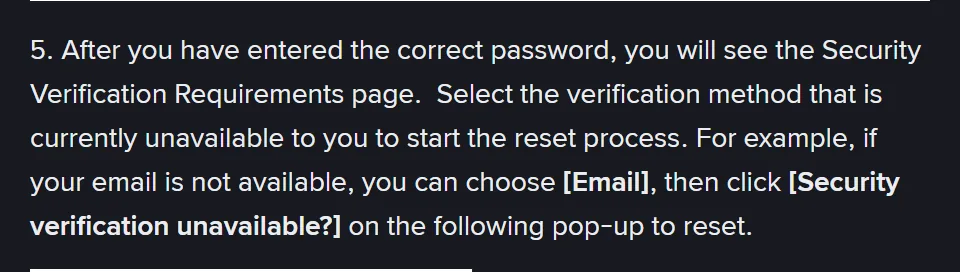
- The Security Verification Requirements page opens. Select the method you can no longer use, then click [Security verification unavailable?] in the pop-up that follows. If that’s Google Authenticator and you had signed the app in to a Google Account, install it on the new phone and sign in to that account first. Google’s help page says your codes then sync to the new device automatically. If the Binance entry appears, log in with it and skip the reset.
- On the Reset Security Verification page, tick every 2FA device you’ve lost and click [Confirm Reset]. Binance wants them all in one go: “Please check all the 2FA devices that you’ve lost access to.” If the SIM went with the phone, that includes SMS.
- Read the pop-up before you click [Confirm]. Binance’s page notes at this step that withdrawals, P2P selling, internal transfers and payment services will be disabled for up to 48 hours after the reset.
- Complete the security checks with the 2FA methods you still have, such as a code sent to your email.
- If Binance asks for a new phone number or email address, enter it, click [Get Code], type in the code and click [Submit].
- A confirmation screen means the request has gone in. Binance’s page says to wait while the request is processed.
No method left for step 8? Skip to no password and no 2FA left.
What the result means, and when to stop retrying
Binance’s page gives three outcomes.
It went through. “If the reset is successful, you can login with your new 2FA device(s).” Set up the replacement authenticator before anything else. Our page on moving 2FA to a new phone, or resetting it when the old one is gone covers exporting codes before your next phone change.
Binance 2FA resetApplication Denied
Binance’s page tells you to double-check the 2FA devices you still have and try again.
Before the second try, we’d make sure each remaining method works today: open the email inbox, and if SMS is one of them, check the SIM is receiving texts. Then tick every lost device in step 6, not only the authenticator.
If the second try ends the same way, turn to Binance’s page on the reset video. It says you can use the appeal feature only once you “have attempted manual reset first”, and on our reading a denied attempt counts. So we’d go to the appeal link or CS Live Chat, both named on that page, rather than try a third time.
Binance 2FA resetUnder Review
A dedicated team is reviewing your request. Binance’s help centre page (updated 18 March 2026) says it “may take up to 24 hours to process”. Its Learn article on the same reset shows no date and says up to 48 hours.
We read both figures in October 2026 on Binance’s help centre page on the reset and its Learn article, and the steps and statuses come from those two and its page on recording the reset video, read the same month, as was every other page quoted here. If a withdrawal depends on either number, open the reset page again first, since figures like these can change.
The result goes to the new verified email address. You can also check it by going back through the “Security verification unavailable?” link.
We’d allow the longer figure, 48 hours. If the inbox and spam folder are still empty after that, contact Customer Support and quote the status word for word.
When support asks for a video
Binance’s page “How to Record a Video for My Reset 2FA Request” says that to reset 2FA you “might need to submit a video to the Customer Service team to verify your request.” It asks for:
- the identity document you verified the account with (“e.g., ID card, passport, driver’s license”), front side to the camera, with your face clearly in shot;
- a well-lit, quiet place and a microphone that works;
- a spoken statement that begins “Today is DD-MM-YYYY, I’m applying to reset the”, names the 2FA you’re resetting (Google, SMS, email or passkey), confirms the request is yours, and gives your account email;
- a photo of the same ID, sent with the video.
“Please do not put watermarks on your videos and do not edit your videos.” If English isn’t your language, the page adds: “You can speak in your preferred language, but please write out and fill in the statement above”. Hold that written statement up with your ID, and send the video through “the reset 2FA appeal link” or “CS Live Chat”.
You may also be asked two optional security questions, about your registration date and registration IP, and the page says answering them can speed up the review. Both are in the email Binance sent when you signed up. Search your inbox for its subject line:
Binance registration email[Binance] Confirm your Registration From XXX (IP address) - XXX (date)
The page doesn’t state a file format, a length limit or a review time.
Lost your phone number along with the phone
When the SIM is gone too, one reset covers both. Tick SMS and the authenticator in step 6, verify with your email in step 8, and add the new number when step 9 asks.
If you can still log in and only the number has changed, Binance’s page “How to Reset My Phone Number for SMS Verification on the Binance Website?” gives the path:
- Log in on the Binance website, hover over the [Profile] icon and click [Account].
- Go to [Security] and click [Manage] next to [Phone Number].
- Click the edit icon next to the number, read the notes and click [Continue].
- Complete 2FA, enter the new number, click [Get Code], enter the code and click [Submit].
This change carries a hold of its own: withdrawals, internal transfers and P2P transactions are disabled for up to 48 hours after it.
If texts still don’t reach the new number, look at coverage before the account. Binance’s SMS page says some countries and regions aren’t supported, and for those suggests “passkeys, BAuthenticator, or Google Authenticator as your primary 2FA.” Verification codes not received by email or SMS goes through the checks in order.
A number that stops working while the phone is still in your hand is a job for the carrier before Binance. The FBI’s Internet Crime Complaint Center describes SIM swapping, where criminals get a mobile carrier to move a victim’s number to their own SIM, then use the texted codes to reset passwords. Its advice is to contact your mobile carrier immediately to regain control of the number. If you also see Binance activity you don’t recognise, Binance’s disable page says you “can disable it to protect your assets”.
Forgot your password and lost your authenticator?
Forgotten the password but still have one method? Click [Forgot password?] at step 4, reset it, then start again from [Log In].
If the password is gone and so is every 2FA method, the reset page doesn’t give you a screen to work through. It says: “If you’re unable to reset your password because you can’t access any 2FA, please contact our Customer Support.” The Binance site footer lists 24/7 Chat Support, and how to reach Binance’s real support shows where the chat is and how to get a person on it.
Knowing the password but having no 2FA method left for step 8 is a case the reset page leaves out. On our reading, the nearest fit is the video request, once you’ve attempted the manual reset. Have the ID you verified with, your account email and, if you can find it, the registration email ready before you start the chat.
Nothing on the reset or video pages asks you to read a code out to anyone, and Binance’s security tips page says “Never share the 2FA codes to anyone, especially impersonators that might call you”. The same sentence warns about requests to provide a screenshot, share your screen or access your device.
We’d treat anyone who contacts you first, offering to restore access, as the impersonator that page means. Five checks before you reply to “exchange support” shows how to test a call, text or account.
After the reset: the hold, and a set-up that survives a lost phone
The step 7 hold lasts up to 48 hours, and the reset page gives no way to end it early, so plan any withdrawal around it. Other changes carry holds of their own, and Binance’s other 24- and 48-hour security holds are listed with the page each comes from.
Add a passkey, saved somewhere that syncs. In the app it’s under [Account Center], the profile section, [Security], then [Passkeys (Biometrics)] and [Add Passkey]. On the website, Binance’s passkey page recommends Google Password Manager “because it will be automatically synced with your Google account”, while a passkey saved to your Chrome profile “will only be saved on this device”. On an iPhone, the iCloud Keychain option syncs across Apple devices using the same Apple ID.
Sync Google Authenticator. Google’s help page for Authenticator says signing in to your Google Account in the app syncs your codes across devices (version 6.0 or above on Android, 4.0 or above on iOS). Without that, a lost phone means you “need to visit every site that you have Google Authenticator set up on to remove the codes, and then relink your new device.”
Decide about the setup key. When you link an authenticator, Binance’s app page says “Copy the setup key” and paste it into the authenticator with [Enter a setup key]. The Binance pages behind these steps don’t tell you to keep a copy, and the reset page never asks for one. If you keep one anyway, store it offline and treat it like your password: in Binance’s steps, that key on its own is what adds your Binance entry to an authenticator app.
Keep two methods that don’t live on one phone. Step 8 asks you to verify via your “other available 2FA device(s)”. An email inbox you can open from any device, plus a synced passkey, leaves you a way through step 8 if the phone goes missing again.
Binance 2FA resets you may not need, or didn’t start
My old phone still shows the codes. Do I need a reset?
No. While the old authenticator still works, change it instead. Binance’s page How to Change My Google Authenticator on the Binance App? gives the path: [Account] icon, the profile section, [Security], [Authenticator App], the edit icon, [Continue], then 2FA. Scan the new QR code or type the 16-digit code into the new app, enter the 6-digit code and tap [Submit]. The same page says withdrawals, internal transfers and P2P transactions are disabled for up to 48 hours afterwards.
I got an email about a 2FA reset I didn’t start. What now?
Leave its links alone. Check the sender’s address on Binance Verify, which takes an email address, phone number, website or social media account and says whether it’s officially Binance. Then open the app yourself and look at your security settings. If something there changed that you didn’t change, Binance’s disable page gives the app path: [Account Info], [Security], then scroll to [Manage Account] and [Disable Account].