Binance Account Restricted: What Each Notice Means and How to Remove It
Read the notice word for word. Withdraw Only lifts once [Verified] is approved, a 24–48 hour security hold ends by itself, and a restriction Binance placed goes to Customer Service.
Jump to a section
| What you see | What Binance’s page says | What lifts it | More |
|---|---|---|---|
| “Withdraw Only” on an account that never finished [Verified] | Only withdrawals, cancelling orders, closing positions and redemptions | Completing [Verified] | Withdraw Only |
| “Withdrawal Only” after you started Update Identity | It lasts “until all of your new information has been submitted and verified” | Finishing the update | Withdrawal Only |
| An email asking you to re-verify by a date | A missed deadline means “Withdrawal Only” (one regional Binance page) | Re-verifying from that email | Re-verification |
| Verified, but withdrawals suspended or capped | Incomplete details, several IP addresses, no face check, or fewer than three 2FA methods | Fixing that one, or Binance Support | Still limited |
| Withdrawals paused after a password or other security change | A 24 to 48 hour hold that can’t be lifted early | Time | Timed holds |
| “Your withdrawal may be at risk. You can try again in 24 hours.” | The withdrawal is under review | Binance’s email about it | Timed holds |
| “Your withdrawal may be at risk. You can try again in 48 hours.” | A security measure | 48 hours | Timed holds |
| “Your withdrawal function may be suspended due to risk of fraudulent activity.” | Anti-scam checks: a questionnaire, warnings or a cool-down | Completing what the screen asks | Timed holds |
| A login pop-up, email, SMS or app message saying Binance restricted withdrawals or trading | A restriction Binance placed | Customer Service, where an appeal is open | Binance restricted it |
| A source of funds and wealth request | Features may be “restricted or temporarily unavailable” until it’s done | Completing it; review takes up to 3 to 10 business days | Source of funds |
| Account disabled, with a pop-up at login | The account was disabled | The pop-up’s button and security checks, then up to 48 hours for withdrawals and P2P | Disabled |
| Products gone after moving, or while abroad | What you can use depends on your country of residence | After a move, updating your address and verification; a travel block has no workaround | Moving or travelling |
| An account deactivation notice | Binance “is no longer able to provide services to you” | Binance’s page gives no way to lift it; withdraw before the date | Deactivation |
| One coin’s withdrawals paused, with a recovery time shown | Wallet maintenance or a network upgrade | The coin’s recovery | Not your account |
Note both the exact wording and where it appeared. It may be a label on the account, a message on the withdrawal screen, a pop-up when you log in or an email.
“Withdraw Only” or “Withdrawal Only”: what each means and how it ends
Binance uses two labels that look almost the same and come from different places.
“Withdraw Only” means [Verified] was never completed. According to Binance’s identity verification page (updated 5 June 2026), “Existing users who haven’t completed the [Verified] verification will have their account permissions temporarily changed to “Withdraw Only,” with services limited to fund withdrawal, order cancelation, position close, and redemption.” Your money can still leave. Deposits and new trades aren’t on that list.
The way out is to finish [Verified]:
- On the website, hover over the profile icon, click [Account], go to [Identification] and click [Get Verified]. In the app, tap [Verify Now] on the home screen, or open the account centre and tap [Unverified].
- Select your Residence, the Document Issuing Country/Region and the Document Type.
- Upload your document; for an ID card, both sides.
- Complete the Liveness Check, following the prompts.
- Check your details against the document before confirming. Binance warns: “You won’t be able to change it once confirmed.”
- Wait for the review. Binance says documents are “usually reviewed within 48 hours”, and some cases take longer.
Once verification is approved, Binance’s withdrawal page says “your account’s withdrawal function will be resumed shortly.” If a step keeps failing, our fixes for each Binance verification failure show what to change before the next try.
“Withdrawal Only” means you asked to update your identity. Binance’s update page (updated 13 March 2026) says that “upon declaring to update your KYC materials, your account will be restricted to “Withdrawal Only” mode until all of your new information has been submitted and verified.” The page doesn’t describe cancelling an update, so the way out is to finish it. On the website, click [Update Identity] in the Verification Center. In the app, tap the icon on the home screen, then [>], [Verifications] and [Update Identity]. Choose the reason, pick the issuing country and document type, and follow the steps. Binance emails you when its review is complete, and you then submit your verification again. If your reason isn’t in the drop-down list, the page says to consult customer service.
A re-verification email with a deadline. One Binance re-verification page, written for users in one region, says you can only start once the notification email arrives, and its warning reads “Please complete the verification within the deadline, or your Binance account will be restricted to “Withdrawal Only”.” For that email, see why exchanges ask verified users to verify again.
Verified, but withdrawals are still suspended or capped
Binance’s page “Why Do I Need to Complete Identity Verification for My Binance Account?” (updated 2 April 2026) names four causes: incomplete details, logins from several IP addresses, a face check skipped during verification, and fewer than three authentication methods. What lifts each limit on a verified Binance account takes them one at a time, with the fix for each and when to stop trying.
If a failed verification stopped your withdrawals, Binance’s withdrawal page gives two ways to appeal. On the website, “go to the Withdraw Crypto page and click [Withdraw appeal] on the alert, then submit the required documents.” In the app, go to [Wallets], tap [Spot], then [Withdraw], and tap [Appeal] in the pop-up. If there’s no [Appeal] button, the page says to contact Binance Support.
A failed face check has its own appeal, because “Facial verification may fail due to technical difficulties or device issues”. Clicking [Appeal] opens the [Facial Verification Appeal] page. You may get security questions first, and Binance warns that careless answers can get the appeal rejected. Send the materials it asks for, add context under [Additional Information], and expect the result by SMS or email. If someone else appeared in your face video, a separate Binance page asks for a new video with everyone who appeared on screen together, each holding up their ID, plus a separate selfie, sent to customer service.
Holds that end on their own: 24 or 48 hours
Some suspensions are timers. Binance’s withdrawal page says that “after performing certain security operations, such as changing your password, your account’s withdrawal function will be temporarily suspended for 24 to 48 hours.” The function is “automatically reactivated” afterwards, and “the suspension cannot be lifted before the suspension period ends.” Pages for individual changes give their own figures; the password reset page (updated 15 April 2026) says withdrawals, P2P selling, payment services and internal transfers are disabled for 24 hours after a reset.
The same page lists three messages for when Binance sees “abnormal activities”:
Binance withdrawalYour withdrawal may be at risk. You can try again in 24 hours.
Binance says: “Your withdrawal is currently under review. Please wait patiently for any emails with regards to the latest status of your withdrawal.” Check the account’s inbox, spam folder included, before trying again.
Binance withdrawalYour withdrawal may be at risk. You can try again in 48 hours.
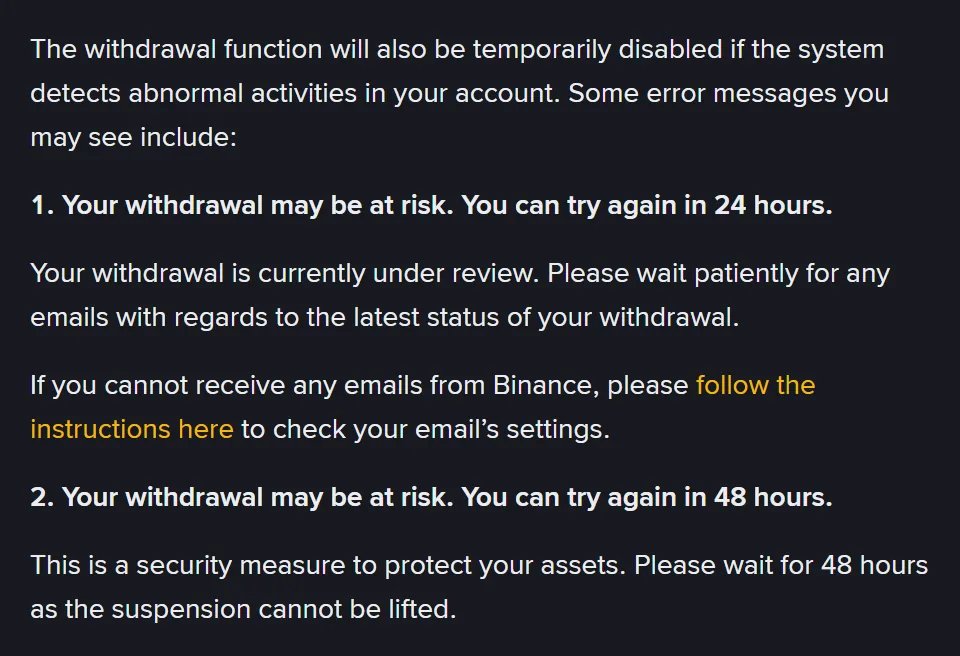
“This is a security measure to protect your assets. Please wait for 48 hours as the suspension cannot be lifted.” There’s nothing to submit.
Binance withdrawalYour withdrawal function may be suspended due to risk of fraudulent activity.
This one appears when a withdrawal “seemingly links to identified patterns of fraudulent action”. Binance may ask for “an anti-scam questionnaire”, “acknowledgement of warning messages before processing a withdrawal”, or a cool-down period, though the page publishes neither the questions nor how long a cool-down lasts. Answer about your own withdrawal as it really is.
We’d read that screen as a pause, not a form to get through. If someone you met online, or someone claiming to be exchange support, is telling you where to send the coins and what to tick, stop there. How fake exchange support works shows how to check a contact.
If the hold followed a security change you didn’t make, that change is what needs dealing with. “If you notice any suspicious activity on your Binance account, you can disable it to protect your assets”, says Binance’s disable page. In the app, that’s [Account Info] → [Security] → [Manage Account] → [Disable Account].
Not your account: a coin or wallet is paused
No appeal is needed when the pause has nothing to do with your account. Binance’s page “What Can I Do When Withdrawal Services Are Temporarily Suspended?” names two such causes, wallet maintenance and a network upgrade on one coin. For a paused coin, “You’ll see an estimated recovery time and the reason(s) for the suspension”, and [Set Reminder] on the withdrawal page sends updates.
When Binance itself restricted the account
Binance’s withdrawal page says it “occasionally enforces restrictions on specific accounts”, including “provisional proactive restrictions on withdrawal or trading functionalities”. When it does, “Binance will promptly inform the affected users via email, SMS, or in-app notifications”, and “affected users will also see a pop-up message on their next login attempt” with more detail on the reasons.
Binance’s Terms of Use (effective 21 July 2026) list the grounds in clause 25.1, and say the list isn’t exhaustive. The ones closest to account problems:
- information you gave is “wrong, untruthful, outdated, or incomplete”;
- verification documents or enhanced due diligence are still pending;
- “an issue has arisen with the verification of your identity”;
- a court order or regulatory direction applies;
- getting round Binance’s controls, “such as opening multiple Binance Accounts without our written consent or abusing promotions”.
The clause says Binance will take “reasonable steps to provide you with notice where appropriate”, but that legal or regulatory obligations sometimes rule notice out. Clause 25.2(b) adds that decisions may rest on confidential risk criteria Binance needn’t disclose, so a notice may not name the exact ground.
What to do with it:
- Open the Binance app, or type the website address yourself, and log in. Don’t use a link in the message.
- Read the pop-up in full, and save its exact wording and the date.
- If it asks for verification or documents, do that first, from inside the account.
- To ask about it or appeal, the page says to “contact Customer Service directly”. Quote the pop-up and name the function that’s blocked.
- Answer what support asks, with genuine documents only.
Straight after the line about Customer Service, the same page adds that “not all account restrictions are open for appeal. This is particularly true in instances involving law enforcement orders or regulatory obligations.” If Customer Service says that’s your case, repeating the appeal won’t change it. Binance’s pages give no time for a Customer Service review of a restriction.
Funds can also be held under clause 25.4. If Binance is informed and reasonably believes assets in an account are stolen or not lawfully held, it may hold them, or the whole account, until evidence it accepts shows you’re entitled to them. It says it won’t take part in the underlying dispute. We’d keep records of where each large deposit came from before anyone asks, because that’s what a hold like this turns on.
Is the notice really from Binance?
A restriction Binance places also shows as a pop-up on your next login, so the quickest check is to open the app yourself. If a message came with a link, a phone number or a Telegram handle, check it on Binance Verify before you reply.
A private message asking you to send coins or money to lift a restriction isn’t from Binance: Binance says it never asks for funds or tokens that way, and the real restriction notice sends you to Customer Service, not to a wallet address.
Source of funds checks: restricted until you answer
Enhanced due diligence (EDD) is the check where Binance asks where your money and wealth came from. Its EDD page (updated 6 October 2026) says: “Failure to comply may lead to some features or services being restricted or temporarily unavailable until the verification is completed.” Clause 7.7.2 of the Terms gives examples of when EDD may be required, including being a politically exposed person or close to one, wanting products Binance considers higher risk, “the nature, size or pattern of your transactions”, and concerns about the source of funds.
The only way through is a true declaration, with documents that match it.
- Go to [Account], then [Identification], and select [Verify Now].
- Declare whether you are, or are connected to, a politically exposed person.
- Tick every source of funds and wealth that applies.
- Upload documents for each source, using [Source of Funds and Wealth Documents] as the list.
- Wait for the review.
“After completing the Source of Funds & Wealth Declaration, please allow up to 3 to 10 business days for review,” the page says. Binance contacts you if it needs more.
The EDD page gave 3 to 10 days when we read it in October 2026; if it gives another figure now, go by that.
If a file is refused on upload, a red bar appears under it; click the file name to see why, then [Upload a different file]. If you have none of the documents listed for a source, [Can’t provide this document?] lets you choose another source that genuinely applies. If a “Need help?” button appears, it hands the submission to customer support. Binance’s source of funds request, document by document lists what each source needs.
Account disabled? The pop-up at login, and how to unlock it
Binance’s disable page (updated 24 November 2025) describes disabling as something you can do yourself after suspicious activity, from [Account Info] → [Security] → [Manage Account] → [Disable Account] in the app. Its unlock page (updated 26 February 2026) covers getting back in, “on the Binance website or app”:
- Log in. A pop-up appears; select [Unlock].
- Complete the security verifications. The page notes that “different verification steps will be required depending on the status of your account.”
- Read the result. If it worked, you can log in. If it’s under review, the page gives no time, only “please wait for the result which will be sent to you via email.” If it failed, try again or contact Customer Support.
After that, Binance asks you to “allow up to 48 hours before you are able to withdraw funds or perform Binance P2P transactions.” If the security check wants an authenticator code you can no longer get, see resetting Binance 2FA without the old app.
Moving country or travelling
Your country of residence affects which Binance products you can use. Binance’s address page (last updated 27 November 2024) puts the change under [Account] → [Identification] → [Edit Address], where you choose the new country, fill in the address and upload a proof of address. It says a new country can mean “resetting your KYC to meet local legal requirements”, and that “you may not have access to the same products or might gain access to new ones based on local regulations.” For what you’ll keep, it says to ask Customer Service. Moving abroad with a Binance account goes through the change step by step. Clause 7.6 of the Terms asks you to report changes like this, and outdated information is one of the grounds in clause 25.1.
Travel is a separate case. Clause 25.5 says: “If you travel to a location included on our List of Prohibited Countries, Binance Services may not be available and your access to the Binance Services may be blocked.” That list is linked from the Terms. The same clause goes on, “You must not attempt in any way to circumvent any such restriction, including by use of any virtual private network to modify your internet protocol address.” Reaching the account through a VPN while you’re in a blocked country would break that rule.
A deactivation notice: withdraw before the date
Binance’s page “Why Did I Receive an Account Deactivation Notice?” (updated 13 May 2026) says it means “Binance is no longer able to provide services to you in line with its Terms of Use.” From then on, “All products and services, except crypto withdrawal, will no longer be available.” Binance “may not be able to share the reason behind account deactivation due to regulatory requirements”; if you have concerns, Binance Support forwards them for further review.
Do not deposit anything into a deactivated account. Binance says new deposits “will not be credited and may result in permanent losses”. If someone else deposits into it, report it to Binance Support.
Before the date in the email:
- Withdraw NFTs first, while you still have crypto for the gas fees.
- Close futures and other derivatives positions. Any left open are closed progressively, and regular trading fees apply. These are leveraged, so a position can lose all the money in it, or more.
- Withdraw your crypto to another platform or wallet that supports the token’s contract address and network. A transfer to another Binance user through Binance Pay “will not go through”.
- Convert small leftover balances to BNB and withdraw the BNB.
- Contact Binance Support about fiat you can’t withdraw, or anything else that fails.
How long a restriction lasts, open positions, a second account and closing it
How long does a Binance restriction last?
It depends on the notice, because each one ends in its own way. A hold after a password or other security change lasts 24 to 48 hours and can’t be lifted early, and the “try again in 48 hours” message means a 48-hour wait. “Withdraw Only” lasts until [Verified] is approved, and documents are usually reviewed within 48 hours. A source of funds review takes up to 3 to 10 business days after you submit the declaration, and after unlocking a disabled account you allow up to 48 hours before withdrawals and P2P. For a restriction Binance placed itself, its pages give no time, and a deactivation notice isn’t lifted at all.
What happens to my open orders and futures positions?
Under “Withdraw Only” you can still cancel orders and close positions. Binance’s Terms of Use (clause 25.3) say that when access is suspended or restricted, open trades and positions may be closed by you or by Binance, depending on the circumstances. Futures use leverage, so a position can lose all the money you put into it, or more.
Can I open a new Binance account instead?
Not as a way round a restriction. The Terms list opening multiple accounts without Binance’s written consent as one of the reasons it may restrict access (clause 25.1(l)), and say it may refuse a new application from someone whose account was previously suspended or terminated (clause 7.3.1(d)). The deactivation page adds that each customer is only allowed to have one verified Binance account.
Can I close the account while it’s restricted?
Not always. Binance’s Terms of Use (clause 24.1) say you may not be able to close an account that is subject to a freeze, hold, limitation or reserve, that has a pending transaction or an open claim, or that owes Binance money. The deactivation page says an account can be closed on request through Customer Service, and that Binance must keep certain personal data for a period afterwards where laws such as anti-money laundering rules require it.
Where each rule comes from
- How to Reactivate the Withdrawal Function for My Binance Account? — security holds, the three withdrawal messages, appeals, and restrictions Binance places; published 8 January 2020, no update date shown
- How to Unlock My Binance Account? — the [Unlock] pop-up, the three outcomes and the 48-hour wait; updated 26 February 2026
- Binance Terms of Use, clauses 7.3, 7.6, 7.7, 24.1 and 25 — when Binance may restrict, hold, suspend or refuse to close an account, and travel to prohibited countries; effective 21 July 2026
- Why Did I Receive an Account Deactivation Notice? — what still works, deposits, positions and new accounts; updated 13 May 2026
- How to Complete Identity Verification for a Personal Account? — Withdraw Only and the 48-hour review; updated 5 June 2026
- How to Reactivate My Account Withdrawal Function If Other People Appeared in My Face Verification Video — the new video and selfie when someone else was on screen; no date shown
- How to Update My Verified Identity Information? — Withdrawal Only mode during an update; updated 13 March 2026
- Why Do I Need to Complete Identity Verification for My Binance Account? — withdrawals limited after verification; updated 2 April 2026
- How to Complete Enhanced Due Diligence (EDD) Verification on Binance? — restricted features and the 3 to 10 business day review; updated 6 October 2026
- How to Update My Residential Address on Binance? — changing country and product availability; last updated 27 November 2024
- Why Do I Need to Re-verify My Binance Account (EEA Countries)? — the deadline and Withdrawal Only; updated 13 March 2026
- What Can I Do When Withdrawal Services Are Temporarily Suspended? — wallet maintenance and paused coins; published 14 May 2021
- How to Disable My Binance Account — disabling after suspicious activity; updated 24 November 2025
- How to Reset Your Binance Account Password? — the 24-hour hold after a password reset; updated 15 April 2026
- Binance Verify — checks whether a contact is really Binance; no date shown