Binance Verification Failed: Fix It by the Message You See
Typing a 6-digit code when it failed? That’s a 2FA code error, not your ID. On the identity screens, find the step that stopped and change only that before the next try.
Jump to a section
Match the words on your screen to the first column, then follow “Do this now” on the same line. The last column takes you to the full answer.
| What you saw | What Binance’s pages say | Do this now | Details |
|---|---|---|---|
| “Wrong code”, “Send code failed” or “We could not process your request” while typing a 6-digit code | A 2FA code error, handled on Binance’s code error page, not its identity pages | New code once, then another device, network or 2FA method | Verification code not received · Authenticator lost |
| “Verification failed” or “please try again” on an identity screen, no reason given | Binance doesn’t publish what each failure message means | Work out which step stopped, change that, retry | Look up the exact wording |
| ID photo not accepted or not readable | Both sides of an ID card; the document choices depend on your country; typed details must match | Retake, check the document type and country, check spelling before confirming | Fixing the document photo |
| Face check failed | “Facial verification may fail due to technical difficulties or device issues” | Camera allowed, no hat, glasses or filter, enough light; then appeal | Face check failed |
| Face check stuck loading, or a number such as 133197 | Binance’s help pages don’t explain the loading screen or the code | Restart the step properly; keep the number for support | Stuck on loading |
| Check stopped halfway | “Do not refresh your browser during the process” | Start the step again in one go | Restarting a cut-off check |
| “ID number has been used” | Not explained; the pages point to sub-accounts, not a second verified personal account | Stop uploading; find the older account or appeal | ID number has been used |
| Proof of address rejected | In your name, recent enough for your country, no photocopies | Send a document that shows all five required details | Address document rejected |
| Still under review | ID documents “usually reviewed within 48 hours” | Wait; don’t resubmit | What each status means |
| Withdrawals limited after verifying, or the account says “Withdraw Only” | Incomplete details, several IP addresses, no face check or fewer than three 2FA methods; “Withdraw Only” means [Verified] isn’t complete | Fix the one that applies | Limits after verification |
Did it happen while you were typing a code?
Binance has a separate page, “How to Resolve 2FA Code Error for My Binance Account?”, for errors at the security code step, whether that’s the 6-digit code from email or SMS or the one in an authenticator app. It names three messages. Two are “Wrong code” and “Send code failed. Please click ‘Get Code’ again.” The third is this one:
Binance code checkWe could not process your request. Please try again later.
None of them is about your ID, so your documents can stay as they are. Every fix the page gives is about the code, the device or the network, and each message gets its own:
| Message | What Binance’s code error page says to try |
|---|---|
| “Wrong code” | Ask for a new code with Get Code, but not over and over: the page warns that doing it too often in a short time might get your account locked. Get the code on another device, such as a computer browser instead of the app. Switch network, or verify with another 2FA method such as a passkey or Google Authenticator. |
| No code arrives | Check that you pressed Get Code, look in spam and deleted mail, add Binance’s emails to your safe-senders list, and try again after about 10 minutes, because heavy traffic can delay codes. If you signed up with an Apple ID using Hide My Email, the code may go to the address linked to that Apple ID; the page says to find it in your Apple ID’s sign-in and security settings. |
| “We could not process your request…” | Switch Wi-Fi network or move to mobile data, clear the browser’s cache and cookies, open the Binance website in a private (incognito) window, or log in from another device. |
| “Send code failed…” | Get the code on a different device, such as a computer or phone browser, and change network connection. |
Stop asking for new codes once you’ve tried a second device and a second network. After that, a code that never arrives and an authenticator app you no longer have are separate problems, with pages of their own: verification codes not received and a lost authenticator.
“Verification failed” and nothing else: find the step first
Binance’s help centre doesn’t publish a list of identity verification failure messages, what each one means, or which step each one belongs to. It does publish what each step needs, which makes “which step was I on when it stopped” a more useful question than “what does this message mean”. Binance’s identity verification page (updated 5 June 2026) puts the website steps in this order:
- Hover over the profile icon, click [Account], go to [Identification] and click [Get Verified]. In the app, tap [Verify Now] on the home screen, or tap the account centre icon and then [Unverified].
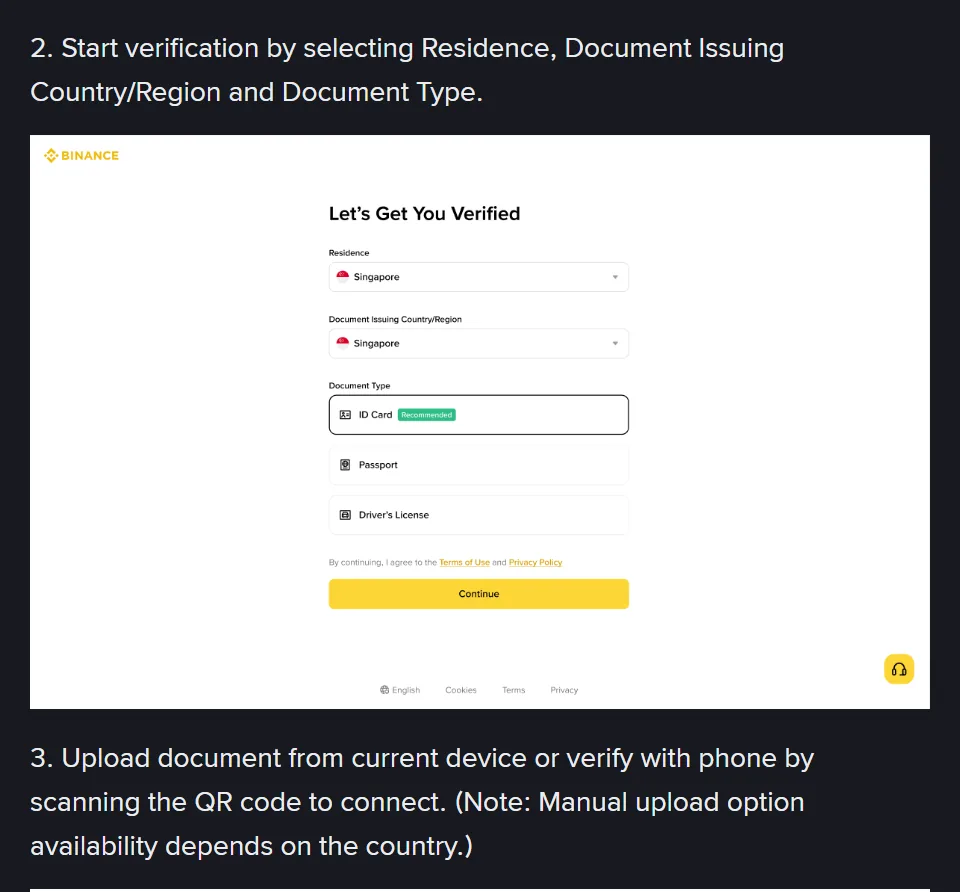
- Select your Residence, the Document Issuing Country/Region and the Document Type.
- Upload the document from the device you’re on, or scan the QR code to carry on with your phone. Binance notes that the manual upload option depends on the country.
- For an ID card, upload the front and the back, then click [Continue].
- Do the Liveness Check, following the instructions on the screen.
- Confirm your personal information and click [Continue]. The page warns: “You won’t be able to change it once confirmed.”
- Wait for Binance’s review. You’re notified once the application is verified.
Now place your failure by when it happened. This is our reading, based on the order of the steps. A failure straight after the camera opened points to the face check, and one right after you uploaded the document photos points to the document. If it arrived hours or days later by email or notification, it came out of the review. If it failed right after you confirmed your details, compare what you typed with the document letter by letter, because that step asks for the two to match.
Change one thing before each new attempt, and make it the thing that step asks for. Only one of the Binance pages here states a limit. The page for migrant residents (updated 19 December 2025) says “You may attempt to complete the Identity Verification process up to 10 times per day.” After ten refusals within 24 hours, it says to wait 24 hours before trying again. The main identity page gives no limit at all. The ten is from the page as it read in October 2026. If you are counting attempts, look at the app or the help centre for the current limit first.
We’d stop well before ten. If two attempts fail after you’ve met every condition for that step, a third gives the check nothing new to look at. An appeal puts a person on it instead.
The photo of your ID or address document wasn’t accepted
Binance’s app instructions say “Most users can choose to verify with a passport, ID card, or driver’s license” and follow it with “Please refer to the respective options offered for your country.” Its document list for one region shows both the choices and their order changing from one country to the next, so a document type someone else used may simply not be on your list.
Before the next upload, go through these in order:
- Pick the Document Issuing Country/Region that actually issued the document. Residence is a separate field on the same screen.
- Choose a Document Type from the options offered to you.
- For an ID card, upload both sides. The page says to click [Continue] “after both sides of the ID Card have been uploaded successfully”.
- If you can’t find a manual upload option, scan the QR code and finish on your phone.
- On the confirm screen, check every detail against the document before you press [Continue]. The page asks that “all the information entered is consistent with your ID documents.”
Some accounts meet a second document check before fiat services, run by a verification provider that depends on where you live. Binance’s page for that check (updated 19 December 2025) shows its buttons. On one set of screens, the photo step offers [Accept] or [Try again], and the readability step offers [Document is readable], or [Try again] and [Choose another document type] if you can’t read it.
That confirmation is yours to make, so look at the preview properly before pressing it.
If your account was verified before and the document has since expired, you don’t need a new verification. Binance lists an expired document as one of the reasons to use [Update Identity] on the [Identification] page. Its update page says that once you declare an update, the account is restricted to “Withdrawal Only” mode until the new information has been submitted and verified, so pick a time when you don’t need to trade.
If it was the proof of address that failed
Binance’s address page (updated 20 April 2026) says the document “must be issued in your name and match the name of the Binance account owner”. The five things it has to show are your name as on your ID, your address as you typed it, an issue date, the issuer, and the issuer’s logo, contact details or website. How recent it must be depends on the country, and the table on Binance’s page gives 2, 3 or 6 months.
Colour screenshots and colour scans are accepted if they’re clear, but “photocopied documents are not acceptable”, and nothing blurred, reflective or black and white is accepted. The accepted files are .PDF, .JPG, .JPEG and .PNG, with PDF the recommended format. The same page turns down payslips, medical bills, mobile phone bills (outside a few jurisdictions) and anything sent to a P.O. box. If yours was rejected, check it against that list and against the date limit first.
The face check failed, froze or stopped halfway
Binance’s identity page gives the liveness check two lines of conditions: “Please enable camera access on your device.” and “Do not wear hats, glasses, or use filters, and make sure that the lighting is sufficient.” The app version adds that your whole face should be “clearly visible, centered”, with your eyes open.
Binance’s face verification page (published 22 October 2025) goes further: “Avoid strong backlighting or shadows on your face.” and “Remove hats, glasses, masks, or anything that might obscure your face.” It also asks for a clean camera lens, a plain background, the phone held steady at eye level, and following prompts such as turning your head slowly or blinking.
For the next attempt:
- Allow camera access for the Binance app, or for the browser if you’re on the website.
- Take off your hat, glasses and mask, and turn off any filter.
- Face the light, with no bright window behind you.
- Wipe the lens, then hold the phone steady at eye level with your face centred and eyes open.
- Follow each prompt on the screen, and stay in the app until it says you’re done.
It’s stuck loading, or showed a number
If the check never moves on, start again from [Identification] or [Verify Now], and write any number down exactly for Binance Support. Binance’s help pages don’t explain the loading screen, and none of the Binance pages quoted here gives a meaning for numbered codes such as 133197, so a meaning you find elsewhere is a guess unless Binance published it.
It stopped halfway
The website instructions say “Do not refresh your browser during the process.” and the app’s say “Do not refresh or quit the App during the process.” Binance doesn’t describe picking up a check that was cut off, so start that step again from the beginning. We’d keep the screen awake and the app in front until it finishes, and leave messages unread until then, since the app instructions ask you not to quit during the process.
When to stop retrying the face check
If you’ve met every condition and it still fails, stop.
Binance’s withdrawal page says “Facial verification may fail due to technical difficulties or device issues”, and that this is why it introduced an appeal, so a person can check the account manually. The face verification page simply says “If verification fails, please contact Binance customer support for further assistance.” Both are covered in how to appeal a failed Binance verification.
If someone else, such as a family member or partner, appeared in your face video, Binance has a separate page for that. It says withdrawals can be suspended when that happens. To restore them, it asks for a new video with everyone who appeared on screen together (a video call counts if you’re apart), each showing their face and holding up their ID, plus a separate selfie, sent to customer service.
Told your ID number has been used?
Binance’s help pages don’t explain this message, and none of them describes uploading the same ID again as a way round it. What they do say is what to do instead of verifying a second personal account: “If you already have a verified personal account, you can either create a separate entity account, or use our sub-account feature, which allows you to create up to 5 sub-accounts under your personal account.” So stop uploading and work out which of these you’re in:
| Your situation | Next step from Binance’s pages |
|---|---|
| You have an older Binance account and can log in | Use that account. For separate balances, the sub-accounts under it are Binance’s answer. |
| You had an account but can’t remember its email or phone number | Use the ‘Forgot Account’ appeal for verified accounts. Binance says its link “is also displayed on your Account’s Verification Center when your KYC verification is unsuccessful.” You need a photo of your ID with the number visible and a statement video recorded “in one continuous take without any edits or cuts”. Review is typically within 1 working day, weekends excluded. |
| You’ve never opened a Binance account | Ask for a manual review with “Appeal KYC Rejection” (see how to appeal). Binance’s privacy portal says its automated KYC checks can get things wrong, and gives twins opening separate accounts as an example. |
Still under review after you submitted?
A review that hasn’t finished isn’t a failure, and the published times differ by what’s being reviewed:
| What’s being reviewed | Binance’s published time | Where it says so |
|---|---|---|
| ID documents | “usually reviewed within 48 hours. However, it may take longer in some particular cases.” | Identity verification page, updated 5 June 2026 |
| Proof of address | “may take up to 1-2 working days”, with “no need to contact the Support Center” | Address page, updated 20 April 2026 |
| ‘Forgot Account’ appeal | Typically within 1 working day, weekends excluded | ‘Forgot Account’ page, updated 26 January 2026 |
Binance’s pages don’t say that submitting again speeds a review up, and the identity page doesn’t name the “particular cases” that take longer. We’d wait the full 48 hours, since that’s the time Binance gives for ID documents. After that, check the email address on the account (spam folder included) and the status on [Identification] before contacting Binance Support with the date you submitted.
Verified, but withdrawals are still limited
Binance’s page “Why Do I Need to Complete Identity Verification for My Binance Account?” (updated 2 April 2026) covers exactly this. Its four causes are details that were incomplete, logins from several IP addresses, no face check during verification, and too few 2FA methods, and each has a different fix, set out in Binance verified but still limited.
Read the label on your account closely, because Binance uses two that are almost the same. “Withdraw Only” is what Binance calls an existing account that hasn’t completed [Verified]. “Withdrawal Only” is the mode an account enters after you declare an identity update, until the new details are checked. Binance’s withdrawal page says that once a verification is approved, the withdrawal function “will be resumed shortly”.
Some withdrawal messages have nothing to do with verification. After security changes such as a new password, Binance pauses withdrawals for 24 to 48 hours and says the pause “cannot be lifted before the suspension period ends”. You may also see:
Binance withdrawalYour withdrawal may be at risk. You can try again in 24 hours.
For that one, Binance’s page says the withdrawal is under review and to wait for its emails about it. It isn’t a verification step, and the page doesn’t ask for documents.
How to appeal a failed Binance verification
Binance describes three ways to ask for a manual review. All of them start inside your own account.
- Self-service appeal. Binance’s privacy portal has you sign in on the app or website, go to your profile and select the headphone or chat icon, click “View more” in the Self-Service section, and scroll to the KYC section. Pick the option that fits, such as “Failed Facial Verification Appeal” or “Appeal KYC Rejection”, and the portal says your request goes to a KYC support agent for a manual review.
- From the withdrawal screen. If a failed verification has stopped withdrawals, go to the Withdraw Crypto page and “click [Withdraw appeal] on the alert, then submit the required documents.” In the app, go to [Wallets], tap [Spot] and then [Withdraw], and tap [Appeal] in the pop-up. If you can’t see an [Appeal] button, Binance says to contact Binance Support.
- The face check appeal. Clicking [Appeal] after a failed face check opens the [Facial Verification Appeal] page. You may be asked security questions first, and Binance warns that if you don’t answer carefully, the appeal may be rejected. Supply the materials the page asks for, following its examples, and put anything that explains your case under [Additional Information]. The result comes by SMS or email.
Before you file, write down the exact wording on your screen, any number it showed, the step you were on, and the device and app or browser you used. An appeal that names the step and the message is easier to act on than “verification failed”.
Using your account, and fixing typed details, while verification fails
What can I still do with my account while verification keeps failing?
It depends on whether the account is new. Binance’s identity page says all new users must complete [Verified] before they can deposit or trade. Existing accounts that haven’t completed it are switched to “Withdraw Only”, which still allows withdrawals, cancelling orders, closing positions and redemptions.
I typed my name or date of birth wrongly and confirmed it. Can I fix it?
Binance’s identity page warns that you won’t be able to change your details once confirmed. The Update Identity option lists set reasons, such as an expired document or a changed name, ID number or nationality, and a typing mistake isn’t one of them. Binance’s update page says that if your reason isn’t in the drop-down list, you should consult customer service.
Binance pages behind these answers, read in October 2026
- How to Complete Identity Verification for a Personal Account? — the steps, the face check conditions and the 48-hour review; updated 5 June 2026
- How to Reactivate the Withdrawal Function for My Binance Account? — appeals after a failed verification or face check, and security holds; published 8 January 2020, no update date shown
- How to Resolve 2FA Code Error for My Binance Account? — the three code error messages; published 10 December 2024, no update date shown
- Why Do I Need to Complete Identity Verification for My Binance Account? — withdrawal problems after verification; updated 2 April 2026
- How to Set up a Binance Account (Migrant Residents) — the 10-attempts-a-day limit; updated 19 December 2025
- What is Face Verification and How to Complete It Successfully? — face check tips; published 22 October 2025
- How to Reactivate My Account Withdrawal Function If Other People Appeared in My Face Verification Video — the new video and selfie when someone else was on camera; no date shown
- What Documents Can I Use to Verify My Binance Account (MENA Regions)? — an example of document choices changing by country; published 23 September 2022, no update date shown
- How to Verify My Residential Address on Binance? (Applicable to All Users) — proof of address rules and review time; updated 20 April 2026
- How to Complete Additional Verification Before Using Binance's Fiat Service? — the second document check and its buttons; updated 19 December 2025
- How to Update My Verified Identity Information? — Update Identity reasons and Withdrawal Only mode; updated March 2026
- How to Appeal for ‘Forgot Account’ on Binance? — finding the account your ID is already on; updated 26 January 2026
- Binance Privacy Portal, section “Is it possible to contest automated decisions?” — the in-app KYC appeal options; no date shown
- Binance Verify — checks whether a contact is really Binance; no date shown