How Long Does Binance Verification Take? What Each Status Means
48 hours is the usual figure for your ID and face check; proof of address can take up to 1–2 working days, and source of funds up to 3 to 10 business days, counted from when you submit.
Jump to a section
Each check runs on its own clock, so look up the one you sent in the table.
| What you submitted | What Binance’s page says | What to do inside that time |
|---|---|---|
| ID document and face check, sent together for [Verified] | “Submitted documents are usually reviewed within 48 hours. However, it may take longer in some particular cases.” | Wait. Binance sends a notification once the application is verified. |
| Proof of address | “Your Proof of Address may take up to 1-2 working days to be reviewed.” | Wait. The same page adds: “There is no need to contact the Support Center.” |
| Source of funds and wealth declaration | “please allow up to 3 to 10 business days for review” | Wait, and don’t send the same files again: “Resubmissions or additional requests may extend the review.” |
Count from the moment you finished submitting, not from the day you opened the account. Inside those times, a review that’s still running is what these pages lead you to expect. Give the verification wait clock the date and time you submitted and it shows where the published time runs out, in hours or working days, in your own time zone.
We read the three times in October 2026, the first from Binance’s identity verification page (updated 5 June 2026), the second from its proof of address page (updated 20 April 2026) and the source of funds figure from its enhanced due diligence page (updated 6 October 2026). The EDD page is the most recently updated of the three, and the likeliest to have moved, so check its number, or the one in your app’s request, before you start counting.
What each status means, and whether to keep waiting
Binance’s identity and address pages don’t print the label your screen shows while a check is waiting. They say Binance “will review your data in a timely manner” and that you’ll be notified of the outcome, so whatever word your screen uses at that stage, read it as “not decided yet”. The labels the pages do name are these:
| What you see | What Binance’s pages say about it | What to do |
|---|---|---|
| [Unverified] | The button in the app’s account centre that starts identity verification | Nothing is in review until you’ve finished every step. Start, or start again, from here or from [Verify Now]. |
| A waiting status after you submitted | “Binance will review your data in a timely manner.” | Wait out the published time for that check. |
| [Verified] | The level every new user needs to use Binance’s products, deposits and trades included | Done. Your current limits are on [Identification]. |
| “Withdraw Only” | An existing account that hasn’t completed [Verified], with “services limited to fund withdrawal, order cancelation, position close, and redemption” | Not a review. Complete [Verified]; that’s what the label is tied to. |
| “Withdrawal Only” | The mode an account enters once you declare an update to your verified identity, until the new details are verified | An Update Identity review is open. An email arrives “once the system review is complete”. |
| Verification unsuccessful, or a rejection | Binance’s appeal options include “Appeal KYC Rejection” and “Failed Facial Verification Appeal” | The review has ended, so more waiting won’t change it. Fix the step or appeal. |
| A request for more information | On the source of funds check, Binance “will reach out to you if additional information is required” | Send what’s asked for, once. |
Still pending, and the published time isn’t up
Leave it alone.
If the check was cut short, though, there may be nothing in review at all. The identity page asks you not to refresh the browser, or refresh or quit the app, “during the process”, and it doesn’t describe picking up a check that stopped halfway. So if you closed the app before the last [Continue], open [Identification] and look. If it still offers [Get Verified] on the website or [Unverified] in the app, the check probably never reached Binance, and you’re not waiting on anything yet.
On the website, [Identification] is under the profile icon, then [Account]. In the app, Binance’s update page gets you to its Verification Center through the icon it pictures on the home screen, then [>], then [Verifications].
Unsuccessful, rejected, or failed at the face check
The clock no longer applies. Binance’s withdrawal page says “Facial verification may fail due to technical difficulties or device issues”, which is why it offers a manual appeal. Work out which step stopped and change only that before the next try, or ask for a person to look at it. Our step-by-step fixes for a failed verification explain each message by the step it comes from, and list each appeal. If the same step fails again after you’ve met every condition Binance lists for it, we’d appeal rather than try a third time.
Binance asked for more information
A request means the next step is yours. If it’s a proof of address that came back, check the document against Binance’s rules first; our page on address documents Binance turns down goes through the five details it must show and the date limits. For a source of funds request, the EDD page warns that “Failure to comply may lead to some features or services being restricted or temporarily unavailable until the verification is completed.” Our page on answering a source of funds request covers which documents fit each kind of income.
While you wait: three things that don’t help
Sending the same documents again. Binance’s identity page doesn’t say a second submission speeds anything up, and its source of funds page warns of the opposite: “Resubmissions or additional requests may extend the review.” We’d only upload again when Binance asks for it, or after a rejection, with the thing that failed changed.
Contacting support inside the address window. For proof of address, Binance’s page says plainly that there’s no need to contact the Support Center during the 1–2 working days. The result comes to you once it’s ready.
Opening a second account to try again. The identity page’s answer for anyone wanting a second verified personal account is a separate entity account, or up to 5 sub-accounts under the personal one. It doesn’t offer another personal account, and a second one would need the same ID you’ve already sent.
What does help is making sure the result can reach you. The app instructions say approval comes as “an email notification”, so check the inbox of the email address on your account, spam folder included. If you can’t find any emails from Binance at all, fix that first, because the outcome of every review here arrives by email, notification or SMS.
Someone offers to speed up your review
None of Binance’s identity, address or source of funds pages offers a faster or paid review, and every appeal Binance describes is made on its own website or app. A stranger who promises a quicker approval in return for your ID, a selfie, a code or a fee is offering something those pages don’t. The identity page also rules out the other offer you may get, with the line “You cannot transfer your account to another person or substitute another person’s ID for your ID.”
If the offer came by message, email or call in Binance’s name, put the sender into Binance Verify, and treat any request for a fee or for your ID as a fake whatever it says; five checks for fake support and KYC messages cover the rest.
Verification taking too long? When to contact support
An ID review at hour 49 isn’t a rejection.
The identity page says reviews “may take longer in some particular cases” without naming them, and the source of funds page adds that “Processing time may vary depending on the case complexity and document completeness.” Binance’s pages don’t name a point at which you should get in touch about a slow review, so once the published time has passed, take these steps in order:
- Open [Identification] and read what it says now. A request for a document or a rejection there is a different problem from waiting, covered under what each status means.
- Search the inbox of the email address on your account, spam folder included, for a message about the review.
- If neither shows anything new, contact Binance Support while signed in. According to Binance’s privacy portal, you get there from your profile, then the headphone or chat icon.
- Say which check you submitted (ID and face, proof of address, or source of funds), the date and time you submitted it, and whether you used the website or the app. Add any message or number that appeared on screen, word for word.
Then wait for the reply to that one contact. We wouldn’t send a fresh submission while the first is still open, because the EDD page warns that resubmissions may extend the review. If support asks for something, send that and nothing else.
Reviews Binance gives no time for
Several reviews have no published time at all. For these, the wait clock can show how long it has been, but there is no point at which the wait counts as late.
- Update Identity. Declaring an update puts the account in “Withdrawal Only” mode until the new details are submitted and verified. The update page says you’ll receive an email “once the system review is complete”, then you submit your verification again. If the update won’t go through, the page says to “kindly reach out to Binance Support for assistance.”
- Facial Verification Appeal. After a failed face check, [Appeal] opens the [Facial Verification Appeal] page. Binance’s withdrawal page says: “Your appeal will be reviewed shortly. Please wait patiently. We’ll notify you of the result via SMS or email.”
- Self-service KYC appeals. “Appeal KYC Rejection” and “Failed Facial Verification Appeal”, in the Self-Service section behind the headphone or chat icon on your profile, send your case to a KYC support agent for a manual review. Binance’s privacy portal says the agent will get back to you.
- Withdrawals paused until you’re verified. Binance’s withdrawal page says that once your verification is approved, “your account’s withdrawal function will be resumed shortly.”
- Someone else in your face video. A separate Binance page covers this. It says withdrawals can be suspended and asks for a new video with everyone who appeared, sent to customer service.
Waits that aren’t identity verification
A few other Binance screens say “under review” or give a number of hours, and they’re easy to mix up with the identity check. If one of these is on your screen, the review times for identity, address and source of funds checks don’t apply.
| What you’re waiting on | What Binance’s page says |
|---|---|
| A 2FA reset showing [Under Review] | A dedicated team reviews it, which “may take up to 24 hours to process”, with the result sent to your new verified email address. That’s the help centre page “How to Reset 2FA When I Can’t Access My Binance Account?” (updated 18 March 2026). Binance’s Learn article on the same reset, which shows no date, says up to 48 hours. |
| A 2FA reset showing [Application Denied] | No wait. Check which 2FA devices you still have and try again. |
| Withdrawals after a successful 2FA reset | Allow “up to 48 hours before you are able to withdraw funds”, P2P transactions and internal transfers included. |
| Withdrawals after a password change | Suspended “for 24 to 48 hours”, and “the suspension cannot be lifted before the suspension period ends.” |
| A ‘Forgot Account’ appeal | Reviewed “typically within 1 working day (weekends excluded)”. |
| A disabled account you’ve asked to reopen | If the request is under review, the result comes by email. Once it’s reopened, allow up to 48 hours before withdrawals or P2P transactions. |
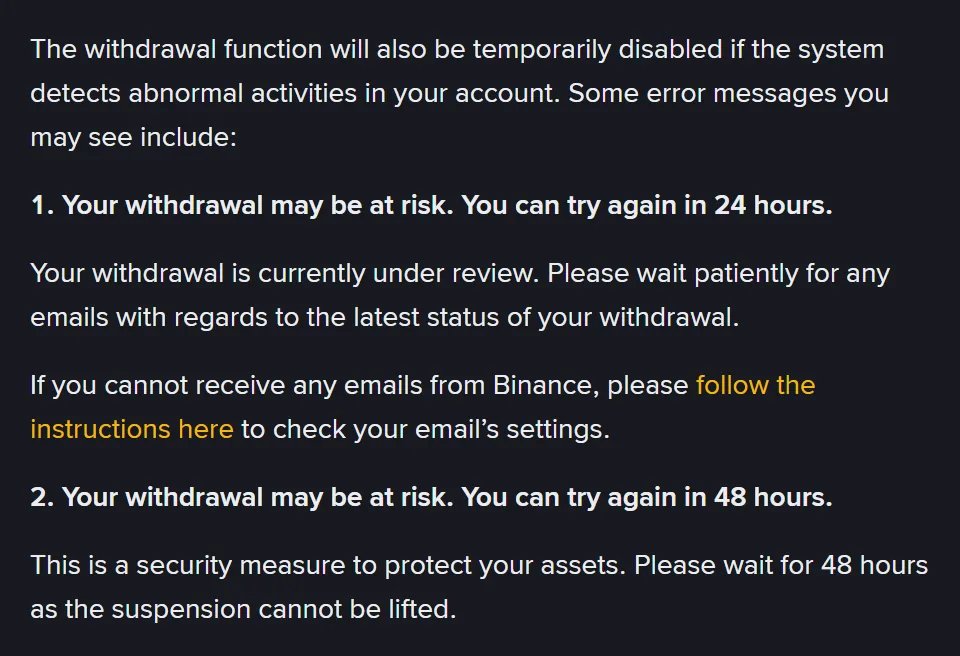
One withdrawal message uses the same words as a verification wait:
Binance withdrawalYour withdrawal is currently under review. Please wait patiently for any emails with regards to the latest status of your withdrawal.
Binance’s withdrawal page lists it under the message “Your withdrawal may be at risk. You can try again in 24 hours.” It’s about that withdrawal alone, and the page asks for no upload. If the [Under Review] on your screen came from a 2FA reset instead, our page on resetting Binance 2FA goes through the reset screens one at a time.
Who reviews your Binance documents, and whether weekends count
Does a person or a computer check my documents?
Both, at different points. Binance’s privacy portal says its identity checks use automated decision-making on the documents, photo and live video you send, and that the process “isn’t perfect” and errors can occur. When you appeal, the portal says the request goes to a KYC Customer Support Agent for a manual review, and Binance’s withdrawal page describes the face check appeal as a manual check by its “dedicated auditors”.
Do weekends and public holidays count towards the wait?
The ID review is given in hours, so the page doesn’t separate weekdays from weekends. The proof of address time is in working days and the source of funds time in business days, but Binance doesn’t say which time zone or which public holidays it uses. The one page that spells it out is the ‘Forgot Account’ appeal page, which says “typically within 1 working day (weekends excluded)”. Our verification wait clock counts Monday to Friday in your own time zone and counts public holidays as working days.