Already Verified but Asked to Verify Again? Why Exchanges Ask, and What to Send
Yes, it’s normal. Exchanges re-check verified accounts when an ID expires, when their rules change, or in a scheduled review, and what the request asks for usually shows which one you’ve got.
Jump to a section
Sign in the way you always do and find the request on your account. Then match what it asks for:
| The request asks you to | What usually prompts it (our reading) | Where to go |
|---|---|---|
| Renew, replace or re-upload your ID | The document on file has expired, or your name, ID number or nationality changed | Expired or changed ID |
| Confirm details you already gave, by a date | A scheduled review, or a change in the exchange’s rules | Dated requests |
| Verify or answer questions before a card, fiat or payment service | That service’s own requirement | New services and moves |
| Update your country or address | A permanent move | New services and moves |
| Explain where your money came from | A source-of-funds review | Source of funds proof |
| Nothing on the account, only a message or a call | Possibly not the exchange at all | Is it genuine? |
Can you still withdraw meanwhile? On two of the five exchanges compared here, yes; on one, a reset closes withdrawals; and the pages for the other two give no plain yes or no. See what still works on your exchange before you start an update.
Asked to confirm your details again by a deadline?
Exchanges keep checking after the first approval. You may be asked again when your ID expires or regulations change, when your activity grows or shifts, and in a deeper review usually called enhanced due diligence. Periodic reviews are part of it too, run on a schedule as part of an exchange’s regulatory or compliance obligations, and two of the five point out that being asked doesn’t by itself mean you did anything wrong.
A rule change can arrive by email, in batches. Binance’s re-verification page, written for users in one region, says existing users have to verify again after it upgrades its compliance standards. It names four situations that call for it: you verified before the new standard; you never sent proof of address or answered its due diligence questionnaire; you were checked by its old ID verification provider; or your earlier check doesn’t meet the new standard. You can only start once your email arrives: log in, click [Continue] on the pop-up, [OK] in the Verification Center, then [Start Now].
On OKX’s list, the details you may have to confirm are your name, ID number and date of birth, your address with proof of address if applicable, and how you use the account, such as salary deposits, savings or money transfers. If nothing has changed, its Standard Refresh only asks you to review and confirm them, and you don’t restart the full verification unless the page asks for new documents or a face check.
- Open the request from inside your account. Kraken shows it as a banner at the top of the page, and for now only in a web browser, so you won’t find it in its app.
- Note the completion date. A banner request shows it, and a reminder comes before it. If a document will take longer than that, a slow bank statement for example, contact the exchange before the request expires.
- Send only what’s asked, and confirm rather than re-send what hasn’t changed.
- Follow the status. On a banner request, items go from Submitted to Reviewed. An item marked Needs update comes with the reason and an email, and you upload a replacement.
One more situation calls for support rather than another upload: the page shows Submitted or Under review and gives you no new task. Don’t send the same information again; contact support once the time shown on the page or in its latest message has passed.
One anti-money laundering rule spells out why the checks continue. The US Customer Due Diligence Rule requires the firms it covers to have procedures designed to “conduct ongoing monitoring” and, “on a risk basis, to maintain and update customer information”. It is written for US banks, mutual funds, securities brokers and similar firms; the exchanges point to their own regulatory obligations instead. Read it as the general idea behind re-checks, not as the rule your exchange follows.
An expired ID, or details that changed
Renew the document first, then update the account with it. Each exchange starts that update from a different place and asks for slightly different things:
| Exchange | Where you start | What it asks for | Review time its page gives |
|---|---|---|---|
| Binance | [Update Identity] in the Verification Center, with an expired document as the reason | The document’s issuing country or region and its type, then the on-screen steps; once an email says the review is complete, you submit your verification again | None on the update page |
| OKX | The update task on Profile > Identity verification | The renewed original document, plus any face or security check the page shows | Most reviews “complete quickly, but some require additional checks” |
| Kraken | The prompts in the app or website once it asks you to update your details; it names an expired ID among its reasons for restricting an account | “Clear, up-to-date documents” and an answer to every question | Restriction reviews usually take 10–14 business days |
| Bybit | Update Info on the Identity Verification page, then Proof of Identity | A reason, a ticked disclaimer and a security or face check, then the usual Standard Verification with the new document | About two hours to amend identity or address documents |
| Bitget | Reset Identity Verification in the Self-Service Section | A reason (“ID loss or update” is one), a face check that matches your earlier one, and a new ID | Usually 1–3 business days |
That [Update Identity] button accepts seven reasons, starting with expired documents. The others are a changed name, a changed ID number, a changed nationality, documents needed for a specific fiat channel, switching your name to “a system-recognizable language”, and documents for the exchange’s own card. In the app, the button sits behind the icon on the home screen, then [>], [Verifications] and [Update Identity]. If your reason isn’t in the drop-down list, the update page says to consult customer service.
Bybit’s Update Info self-update keeps your existing verification instead of resetting it. That works only on an account that is verified, isn’t a sub-account, isn’t suspended or restricted, and isn’t already partway through an update or a transfer of its verification. After an identity document update you wait 15 days before the next; between address documents, 180 days.
When the update button isn’t there. One help page puts it plainly: if the identity verification page shows no Edit, Update, Refresh or similar entry, self-service isn’t supported for that account, field, status or update frequency. It asks you to contact support and explain why the information must change, what the field shows now, what it should say, and which official document backs that up, and not to keep reinstalling the app in the hope that the option appears. The [Update Identity] page, for its part, sends you to its support team if you can’t go on with an update.
When the date is close and the new document hasn’t arrived. Check whether the page offers another original document that you do hold, such as a passport. If nothing else is listed, fetch a supported original and finish the task as soon as you can, watching the page and your registered email for the deadline. Two of the five don’t let a photocopy, a screenshot, a scan, a picture shown on another screen or an electronic ID from another app stand in for the original; one makes an exception where the verification page offers that method. If you’ll miss the date anyway, see dated requests for contacting the exchange before the request expires.
If it’s your name that changed, or the exchange read it wrongly, correcting a verified name covers each exchange’s option and the documents they ask for.
Asked again for a new service, or after a move
A new product, or the rules for your region, can call for a higher level of verification. A fiat service can bring its own extra check, which on one exchange comes in one of three forms: an ID and selfie check followed by a short questionnaire; a questionnaire of four questions on its own; or documents declaring your source of wealth. No review time is given for any of them.
Travelling isn’t moving, and two of the five say so plainly: travelling needs no update to deposit or withdraw, and a short trip or temporary stay normally doesn’t call for a residence change. After a permanent move:
- Finish or cancel open trading and Earn orders before you answer a residence-change prompt, if it asks you to. Residence can normally be changed only a limited number of times on at least one exchange.
- A new address may go through a form of its own, with proof of address for the new home.
- A new country may mean resetting your verification to meet that country’s rules, and the products open to you may change; moving country on Binance goes through it step by step.
What counts as proof of the new address, and how recent it must be, is in proof of address for crypto exchanges.
Can you still trade or withdraw while you re-verify?
| Exchange | While the check is open | If the deadline passes |
|---|---|---|
| Binance | Once you start an identity update: “Withdrawal Only” until the new details are submitted and verified | Its regional re-verification page: the account is restricted to “Withdrawal Only” |
| OKX | Re-verification may first ask you to finish or cancel orders, redeem Earn products and move the remaining assets out; it says this step can’t be bypassed. Until an ID update is done, some features may be unavailable, as your account page shows | “temporary account restrictions”, without listing which |
| Kraken | The request stays as a banner on the account; the page describes no limit meanwhile. If an expired ID has led to a restriction instead, deposits or withdrawals may be unavailable until the review ends | It may pause activity such as trading and deposits; “Withdrawals are not affected.” |
| Bybit | A self-update keeps your existing verification in place | The self-update page sets no deadline |
| Bitget | A reset marks the account unverified, with deposits, withdrawals and trading restricted until you verify again | You start a reset yourself; the page sets no deadline |
If you need your money while a check runs, look at your exchange’s row before you start anything. On two of them, starting an update or a reset is itself what limits the account.
If a re-verification asks you to clear your assets and a balance too small to withdraw is left, its page says to look for a Forfeit button, and warns that forfeiting is permanent.
None of the five describes a way to skip a review. A periodic compliance review usually needs supporting documents before it’s complete, though you can still ask support where it stands. If the whole account is limited rather than one request being open, the account-wide restriction notices and what lifts each one may match what you see.
Is the request genuine?
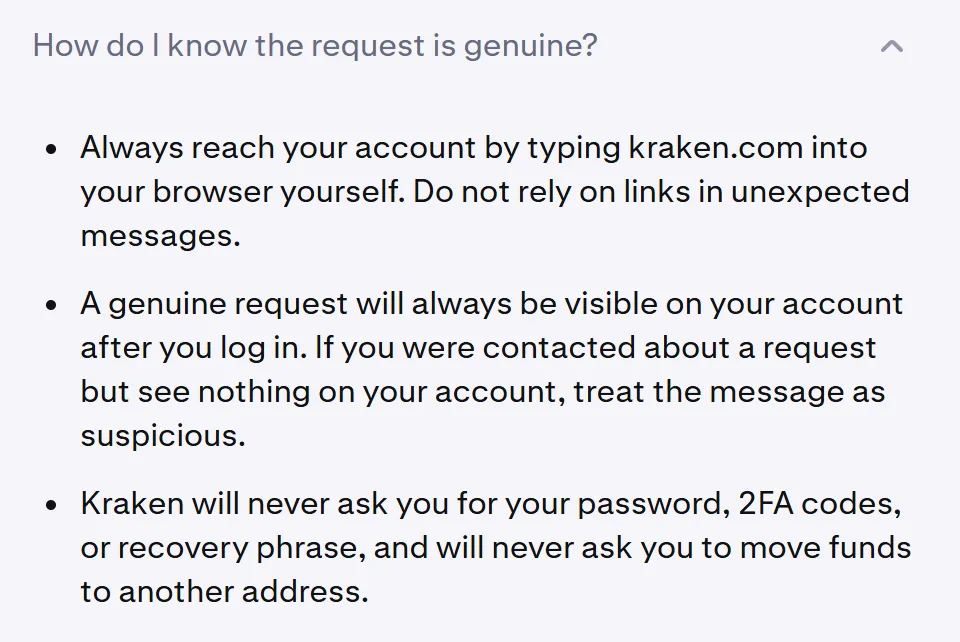
Check before you upload anything. A real request waits on your account. The help page on these requests, pictured below, says a genuine one “will always be visible on your account after you log in”, and that a message about a request you can’t find there should be treated as suspicious. It also says it will never ask for your password, 2FA codes or recovery phrase, or ask you to move funds to another address.
If the request came by email or text, run the sender through the exchange’s own lookup, where there is one.
Do the re-verification itself from your own login, never through a link in the message. If you’ve already replied or uploaded something, start with what to do after replying to a fake KYC message.
If the date passes before you answer
Answer the request anyway. Three of the pages tie the limit to the missing information, not to a set period.
Depending on the exchange, a missed date can mean a pause on activity such as trading and deposits, decided case by case, or a restriction that is extended, up to the account being suspended “until the required information is received”. Even then, at least one exchange’s restriction page says a restricted account may still be able to sign in, view balances and transaction history, close open positions and submit the documents asked for; each exchange’s terms are under what still works while you re-verify.
Source-of-funds requests carry their own dates. Depending on the exchange, missing one can mean restrictions on deposits, withdrawals or trading, delays in processing transactions, or some features or services restricted or temporarily unavailable until the check is done.
If a missed deadline has left the account on “Withdrawal Only”, the help page that describes that mode doesn’t list what else still works in it. (The similar-looking “Withdraw Only” label is a different one, for accounts that never finished [Verified].)
- Sign in yourself and find the request again. Look for the banner or task on the account, or check the ticket centre and your registered email.
- Send everything it asks for, in one go, so the review isn’t left waiting on the rest.
- Keep using what still works, and give the review the time your exchange quotes before you chase it.
How long a re-verification takes
Anything from about 5 minutes to 14 business days where a page gives a figure, and several give none. The kind of check makes a bigger difference than the exchange.
For an ID update, each exchange’s figure is under an expired ID, or details that changed. Smaller fixes can be quicker: the self-update page gives about 15 minutes for an address update, against about two hours when an identity or address document has to be replaced, and for a corrected name, usually about 5 minutes but up to one working day.
Banner requests come with no review time, and you get an email when the whole review is complete.
Source-of-funds reviews run longer, from up to 5 business days to as many as 10, depending on the exchange, and resubmissions or extra requests may extend them.
One exchange gives restriction reviews the longest figure: usually 10–14 business days from the date of the restriction, and longer when it’s busy. If more than 14 business days pass with no word, it asks you to use chat support. That figure changed in October 2026, from 7–10 business days. We read every help page quoted here that same month, and a figure that has moved once can move again; whatever your help centre or app shows now is the one to count from.
Where a page gives no figure, one exchange still sets a point to chase: if you sent information more than 48 hours ago and have had no update, it asks you to contact support with your ticket number.
Resending the same files is no shortcut, and two of the five tell you plainly not to.
New document numbers, your balance and a missing email
Does KYC expire once you’ve passed it?
The document behind it can: an expired ID is one of the reasons exchanges ask a verified account to update. Rule changes and scheduled reviews can bring a request too, so a pass gets re-checked rather than settled for good.
My renewed passport has a new number. Will that look like a mismatch?
Not by itself. On Binance, a changed ID number is one of the listed reasons for updating a verified identity. At least one other exchange we checked allows an update as long as it stays with the same verified person; what it rules out is replacing the account holder or moving the verification to someone else. Where the update is a full reset, a new ID is expected, and reusing the old one may lead to rejection.
Will re-verifying touch my balance or trade history?
Not on the pages that cover it. Bitget’s reset page says a reset doesn’t affect your trading history or assets. Where a re-verification asks you to move assets out first, OKX says you can transfer supported assets back once the re-verification is approved, that it can’t convert, trade or transfer them on your behalf, and that your recorded balance won’t disappear while a source-of-funds review is pending.
My ID expires next month. Should I update it before I’m asked?
Where the exchange offers a self-update, we would, once the renewed original is in your hands. An ID that is missing, expired or couldn’t be confirmed is among the most common reasons for a restriction on at least one exchange. Updating on your own date also means any limit that comes with the update, such as a withdrawals-only mode, starts when you choose rather than when a deadline sets it.
I can’t find the email about the request. Can I still answer it?
You don’t need it if the request sits on your account. At least one exchange we checked sends the email only to the address registered there, so check that inbox and its spam folder, and search for the email rather than scrolling. If you still see no request after signing in, contact the exchange.