Missed the Binance Referral Code? How to Add It After Sign-Up
Yes, within 30 days of registering, if all six of Binance’s conditions hold, including no deposit, no trading and no referrer yet. You enter the code on its referral binding page.
Jump to a section
The binding page is binance.com/en/activity/referral/bind-ref, the address Binance links under the word “here” in question 4 of its Referral Pro FAQ. Log in to the account that needs the code, open that address in the same browser, enter the code and confirm. Check the six conditions first, because the 30-day window is only one of them.
After 30 days, or once money has gone in, that page no longer applies. Binance documents two narrower options for accounts with no referrer, called rebind and recall, each with its own conditions. An account that already has a referrer keeps it, and nothing changes that.
Find your account in the table, then go to its section.
| Your account | What Binance’s FAQs allow | Where to go |
|---|---|---|
| Registered less than 30 days ago, nothing deposited, nothing traded, no referrer | Bind a code yourself on the binding page, if all six conditions hold | Bind it yourself |
| Opened through someone’s link or code, or a code was bound later | No change: a referral relationship “cannot be changed or removed” | It stays |
| No referrer and no trading history, but past 30 days or already deposited | Self-rebind, which the rebind FAQ offers to users with no trading history | Rebind |
| No referrer, has traded, under 5,000 USD of trading in the last 90 days | A rebind application, which binds only if a trading-volume condition is then met | Rebind |
| No referrer, more than 90 days old, no trading or product use in the last 90 days | Recall: open a newer-style referral link, log in, press [Bind Now] | Recall |
| No referrer, more than 5,000 USD traded in the last 90 days | None of the three options fits at the moment | What won’t work |
Under 30 days old with nothing deposited: bind the code yourself
This is the fix for a referral box skipped at sign-up, or a [Next] pressed too quickly. Binance’s Referral Pro FAQ, the help page Frequently Asked Questions on Binance Referral Pro Mode (updated 5 August 2026), says the binding page is only available to users who meet all six of these:
- Your identity (KYC) information hasn’t been used on another account in the past 180 days.
- The account has no referral relationship yet.
- It is a parent account, not a sub-account.
- You are within 30 days of registering.
- The account has had no deposit and no trading.
- The account isn’t flagged as a wash trader.
Two of these are easy to miss. The fifth means a deposit on its own closes this option, even if you never bought anything with it. The first follows your identity from account to account. If the same ID details were verified on another Binance account in the last 180 days, this one doesn’t qualify, and the FAQ makes no exception for an account you have since closed. The FAQ doesn’t say whether identity verification has to be finished before you bind.
If all six hold:
- Log in to the Binance account that needs the code, in a web browser on a computer or phone.
- In the same browser, open binance.com/en/activity/referral/bind-ref, typed exactly as shown.
- Enter the code, then check every character against the one you were given.
- Confirm. Binance’s help pages don’t describe the binding page’s buttons or messages, so follow the wording the page shows you.
If no one gave you a code and you’d like to use this site’s, here it is:
Binance referral code
ZY1818Paste it into the binding page at step 3. Once bound, it gives you a discount on trading fees*.
*Binance sets the rate and can change it; your account shows the one that applies to you. It covers spot and futures trading fees. Using this code does not make you pay more. The referral programme is not available everywhere — the referral disclosure names the Binance page that lists the excluded regions.
Look at the code once more before you confirm. Question 6 of the same FAQ says a referral relationship, once set up, “cannot be changed or removed”, and that holds from the moment you confirm.
If the page won’t accept the binding, go back through the six conditions. When one of them fails, check what your account can still do: if it’s the 30-day or no-deposit condition, a rebind or a recall may be open; an account that already has a referrer keeps it; and what won’t add or change a code covers the rest. If you’re sure all six hold and it still fails, stop retrying and contact Binance Support through the help centre. Point them to question 4 of the Referral Pro FAQ and ask which condition the account doesn’t meet.
Want to change your Binance referral code? Once linked, it stays
Question 6 of the Referral Pro FAQ settles it in one line: “No, once the referral relationship has been established, it cannot be changed or removed.” None of Binance’s referral FAQs describes a form, a rebind or a support request that swaps one referrer for another.
You can have a referrer without ever typing a code. Binance’s sign-up help page (updated 24 November 2025) says that if you arrived through a referral link, the code “should be automatically filled and you’ll see a green tick and [Linked] next to it.” If you remember that tick on the referral screen at the end of Binance sign-up, the account was bound then.
Binance’s referral introduction page (updated 25 March 2026) adds one more case. Each new user gets one referral mode only, and an account opened through a Referral Lite invite, the kind that earns the inviter a one-off reward, “will not be eligible to sign up again using Referral Pro mode.”
Rebind and recall are only for accounts with no referrer, so they can’t get you round this either.
No referrer, but past 30 days or already deposited: rebind
Binance’s FAQ on the Affiliates Rebind Feature (published 28 September 2026) covers accounts that are already registered and have no referrer. It splits them by trading history, saying “Self-rebind is available for users with no trading history”, while the application “is for users who already have trading history and require additional eligibility checks.” That split is the FAQ’s answer to why some “users rebind instantly while others need to submit an application” (question 17).
Anyone who wants to be rebound has to meet all of these, in the FAQ’s order:
- identity verification (KYC) completed;
- no existing referrer;
- a master account, not a sub-account;
- total trading volume below 5,000 USD (or equivalent) in the last 90 days;
- not flagged for abnormal trading activity, or for behaviour that goes against Binance’s terms and policies;
- not living in a country or region where Binance’s referral programme isn’t supported.
Verified, but your account review is still pending? Then you have to wait. The FAQ says “You won’t be able to use the rebind feature until your account review is fully completed.” What each Binance verification status means, and how long reviews take helps you read where yours stands.
How a rebind starts
As the FAQ describes it, a rebind starts from a link, so there is no menu to hunt for in your own account. Only affiliates can start one, by copying a rebind link from their Affiliate Dashboard and sharing it. Opening it takes you to the rebind page with the referral code already filled in. Nothing binds by itself, though. The FAQ says “you still need to review and confirm the submission yourself.” It also says you can type a valid referral code on the rebind page instead of using a pre-filled one.
The 150,000 USD trading condition on a rebind application
For an account with trading history, sending the application doesn’t finish it. The FAQ says the referral relationship “will be established once the user reaches a total trading volume of 150,000 USD (or equivalent) within 30 days”, counted from the day you apply. Until then, nothing is bound.
We wouldn’t trade a dollar more to reach that figure, because trading costs fees and can lose money, and a fee discount changes neither.
If you weren’t going to trade that much in a month anyway, this option isn’t for you.
The same FAQ answers two follow-ups. A failed application can be sent again, but eligibility is reviewed each time and approval isn’t certain. And you can’t cancel an application yourself; Binance Customer Support does that.
Idle for 90 days and never linked: recall through a link
Recall is for older accounts that have gone quiet. Binance’s recall FAQ (updated 24 March 2026) lists four conditions for the person being invited:
- the account is already registered on Binance;
- it has never been bound to an inviter;
- it is more than 90 days old;
- it hasn’t traded or used any product on Binance in the past 90 days.
Both 90-day figures were 180 days until 24 March 2026, when Binance shortened them, and they still read 90 when we checked the help centre’s Referral Pro, rebind and recall FAQs in October 2026. Windows like these move, so read the FAQ’s current wording before you count on any number here, the binding page’s 30 days included.
Recall runs through a link only. In the FAQ’s words, “Currently, binding the referral relationship with existing users through a referral code is not supported.” It accepts only the newer style of invitation link, and says the older links and QR codes “can only invite new users”. In the FAQ, recall is something Binance affiliates offer, a feature “still in the testing phase” that may not be available in all regions.
The invitee’s side of it, in the FAQ’s order:
- Open this site’s referral link on the device you use for Binance. That link is this site’s Binance referral link. Only accounts that meet Binance’s recall conditions see a confirm-binding prompt after logging in; binding it does not raise your fees, it gives up to 20%* off trading fees, and this site may earn a commission. The referral programme excludes some countries and regions (see the referral disclosure). Crypto assets are high-risk and you can lose all the money you put in. *It applies to spot and futures trading fees; the rate is the one Binance shows and may change.
- Log in to your existing account. If the link opens Binance’s sign-up screen, don’t register again. Use the Log in link at the foot of the screen.
- For an eligible account, the FAQ says “a confirmation window will pop up” once you’re logged in. Press [Bind Now]. That is the step the FAQ says makes the binding take effect.
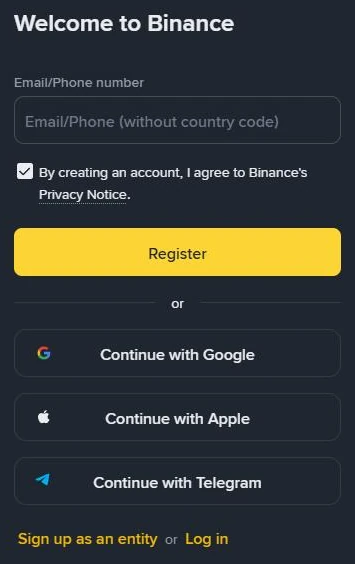
The FAQ doesn’t say what an account that doesn’t qualify sees, so if no window appears, go back over the four conditions. Don’t open a second account to try again.
What won’t add or change a code
- Closing the account and opening a new one. Question 7 of the Referral Pro FAQ asks exactly this, and the answer starts with “No”. If Binance finds an account was closed to open a new one for referral benefits, it “reserves the right to terminate all referral commissions from the new account”. Question 8 explains that the matching identity information is what links the two accounts, and that the user then loses their own share as well. Binance’s account-closure page (updated 3 September 2026) adds that if you create another account after closing one, your identity verification may be blocked for 30 days or longer. If a new account’s check reports your document as already in use, start from the fixes for “ID number has been used”.
- A second account with a different email. Question 8 says the duplicate check looks at identity information, so a new email address changes nothing. The binding page’s first condition also shuts out ID details used on another account in the past 180 days.
- Asking Binance Support to add or swap the code. The only support task the three FAQs mention is cancelling a rebind application, and question 6 rules out changing a referral that exists.
- Letting someone “bind it for you”. Binding, rebinding and recall are all things you do yourself, logged in to your own account; even a pre-filled rebind code waits for you to confirm it. Nobody needs your password, a 2FA code, your UID or remote access to your phone to add a referral code. Anyone who asks for those is not helping with a referral.
A message or a “support agent” offering to sort out your referral is exactly what the five checks for a message that claims to be exchange support are for; run them before you reply.
How a bound Binance referral code works
Do my sub-accounts need their own referral code?
No. Question 9 of Binance’s Referral Pro FAQ says sub-account trading commissions are credited to the master account’s referrer, and that sub-accounts can’t invite new users. The code bound to the main account is the one that counts, and both the binding page and the rebind FAQ accept only the main account.
Can a futures referral code fix it later?
No. Question 5 of Binance’s Referral Pro FAQ says a futures referral code can’t be used to open a Futures account if you didn’t register through that person’s Referral Pro code or link. Futures are leveraged, and you can lose all the money you put in, or more.
When does the discount from a bound code arrive?
Binance’s Referral Pro FAQ says the share paid to referred users is settled in USDC by default. It is worked out and converted every hour, then paid into your Spot account within 6 hours. It comes from trading fees you have actually paid, so trades with no fee produce nothing.