Binance KYC in India: PAN, Accepted Documents and What to Do If Rejected
Binance collects your PAN as part of its identity check, and its April 2025 notice asks users in India, new and existing, to re-verify using the steps in an email it may have sent.
Jump to a section
On the website, hover over your profile icon and go to [Account] → [Identification] → [Get Verified]; in the app, tap [Verify Now] on the home page. Choose India as your residence, upload an identity document from the menu that appears and finish the face check. If an address step follows, the document must be dated within the last 2 months.
Why is Binance asking for your PAN? What the April 2025 notice says
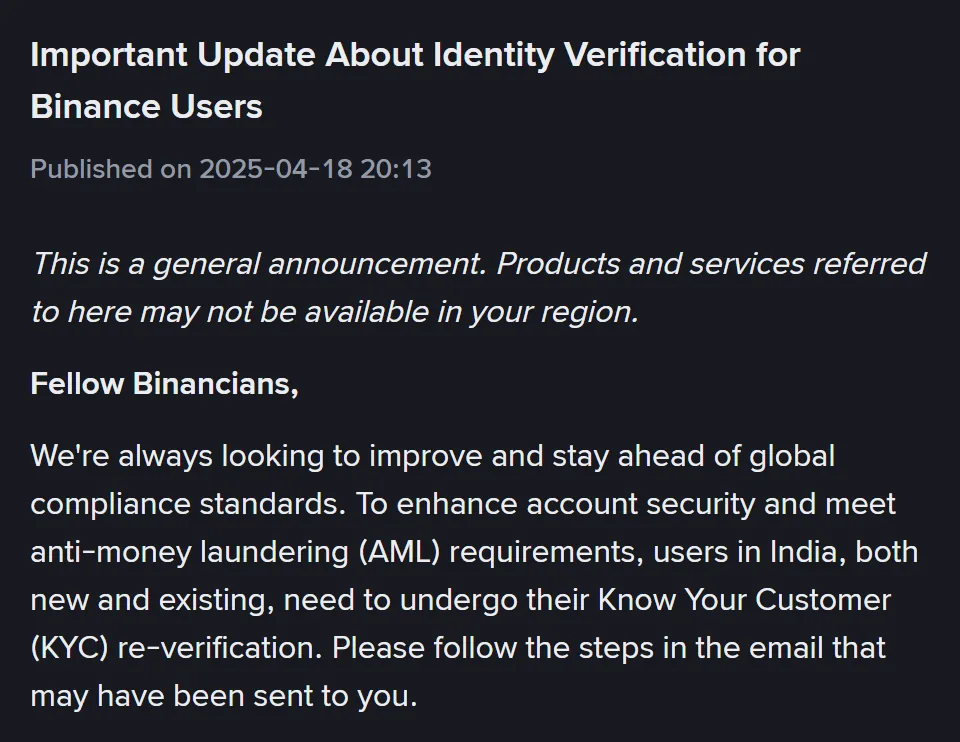
Binance’s announcement “Important Update About Identity Verification for Binance Users”, published on 18 April 2025, makes three points:
- Users in India, “both new and existing”, need to go through KYC re-verification. New users meet it straight after the sign-up screens; opening a Binance account, screen by screen shows that part.
- They should “follow the steps in the email that may have been sent to you”.
- KYC includes “obtaining your PAN details”, which it calls “a requirement under the Indian AML laws” that “equally applies to all local and global exchanges registered under India’s AML legislation”.
It gives no deadline, and it doesn’t say what happens to an account that doesn’t re-verify, which documents to use, or what the email contains.
The nearest rule is on Binance’s general identity verification page. Existing users who haven’t completed [Verified] have their account permissions temporarily changed to “Withdraw Only”, “with services limited to fund withdrawal, order cancelation, position close, and redemption”. That rule is written for unverified accounts in general, so don’t treat it as an India deadline.
No email at all? The notice only says one “may have been sent”, so sign in and look at [Identification], which shows your current verification level. If it shows you as verified and you’re still unsure, ask Binance Support.
Which KYC documents work for an account in India
The identity step opens by asking for your Residence, Document Issuing Country/Region and Document Type. For the document itself, the app steps on Binance’s identity verification page say, “Most users can choose to verify with a passport, ID card, or driver’s license. Please refer to the respective options offered for your country.”
The India version of that page, updated 16 June 2026, prints no India list. It doesn’t name Aadhaar, a voter ID, DigiLocker or Aadhaar OTP, and doesn’t list the PAN card as an identity document. Binance’s proof of address page names none of them either, and the April 2025 notice mentions PAN details but no documents. The list that counts, then, is the Document Type menu you see after choosing India.
If your screen offers DigiLocker or an Aadhaar option, follow its own instructions, because Binance’s identity and address pages don’t describe that path or say whether it changes the photo and face steps.
Here’s how the documents you’re likely to hold line up with Binance’s two lists.
| What you have | Identity step | Address step |
|---|---|---|
| Passport | In the general list | Not on the accepted list |
| Driving licence | In the general list (“driver’s license”) | Not on the accepted list |
| National ID card | “ID card” is in the general list; the menu shows whether yours is offered | Accepted if it shows your home address, but it “cannot be the same document used for identity verification”. The page doesn’t name Aadhaar. |
| PAN card | Not named as an identity document in the April 2025 notice or on the identity verification page; neither says whether you type the number or photograph the card, so keep it to hand | Not on the accepted list |
| Electricity or water bill, bank statement, landline or internet bill | Not in the general list | Accepted, if issued in the last 2 months |
Two more rules come from the identity page. For an ID card, upload both the front and the back. On the website you can upload from your device or scan a QR code to carry on with your phone, but “Manual upload option availability depends on the country”, so the upload choice you’re offered may differ from someone else’s.
Proof of address: India’s window is 2 months
Binance’s address page sets a validity window by country. Countries it doesn’t name get 6 months, and India’s row reads “2 months”, the shortest in the table. The window counts from the date of issue, since Binance “only accepts Proof of Addresses that are dated within the required timeframe from the date of issuance”.
So a bill dated 1 July no longer fits by mid-September, even though a 3- or 6-month rule would still accept it. The proof of address date check works out the last day your document counts.
The upload notes further down the same page mention “three or 6 months depending on jurisdiction”; for India, go by the table row. We checked that row in October 2026 on the India version of Binance’s proof of address page, updated 11 June 2026; if the row reads differently when you upload, go by the page.
Beyond the date, the page asks for your name “the same as the ID submitted”, the address you typed, the date of issue, the issuing authority and a reference to it such as a logo. Photocopies are refused, and a mobile phone bill on its own isn’t accepted “except in several jurisdictions”, which the page leaves unnamed. Its FAQ accepts a package bill covering mobile, internet and TV. Which address documents Binance accepts and refuses has both full lists.
The page describes collecting “one or two documents”, so the address step may not come up at all. When it does, it has its own button:
- Website: [Profile] → [Account] → [Identification] → [Get Verified Plus].
- App: [Account Center] → [Profile] → [Verifications] → [Get Verified Plus].
Review “may take up to 1-2 working days”, and the page says there’s “no need to contact the Support Center”.
Rejected? Start from what you were told
None of the Binance pages we read lists rejection messages for India or mentions a rejection because of your PAN, so these cases follow the general rules those pages do give. For a rejection that has nothing to do with India, such as a blurred photo, each verification step and its own fix starts from the step that failed.
Your name or date of birth doesn’t match
The identity page asks that “all the information entered is consistent with your ID documents”, then warns, “You won’t be able to change it once confirmed.”
We’d type your name and date of birth exactly as the identity document you upload prints them, because that’s the document your entries have to be consistent with, and the PAN card isn’t listed as an identity document. If your PAN shows them another way, say with initials on one and the full name on the other, ask Binance Support how to proceed before you confirm, as Binance’s pages don’t say what happens then. When your name doesn’t match your ID covers missing middle names, swapped names and name order.
Already confirmed a wrong detail? Which way you go depends on why it’s wrong:
- A typing mistake. It isn’t one of the reasons Binance lists for updating a verified identity, and for anything off the list its update page says, “If the reason for your update is not on the drop-down list provided, please consult with our customer service team.”
- A real change. A new name or ID number on the document, an expired document, or switching your name to “a system-recognizable language” goes through [Identification] → [Update Identity]. Binance’s update page lists IN among the countries whose users “may click on the link [Click here to reset KYC]”.
Before you start an update, know that declaring one restricts the account to “Withdrawal Only” mode “until all of your new information has been submitted and verified”.
The face check failed
Binance’s face verification page says a check might fail because of poor lighting, low camera quality, glasses, hats or masks, an “ID photo and live face” that “look significantly different”, or using someone else’s face or ID. The app steps on the identity verification page add that your whole face should be clearly visible and centred with your eyes open, with no filters, and that you shouldn’t refresh or quit the app partway.
If the photo on your ID is old and you hold another document from the menu with a newer one, we’d use that, since a large difference between the two faces is on Binance’s list. What to change before you retry a Binance face check covers the rest.
The address document was refused
Start with the issue date against the 2-month window, then check the name against your ID and the address against what you typed. The address page’s FAQ asks for a complete address “that includes the flat or house number, street, and zip code”. Last comes the image, which has to be in colour, without blur or reflections, captured in portrait and with all four corners showing.
If everything matches, send a different accepted document rather than the same one again.
Rejected with no clear reason? Ask for a manual review
Stop resending the same thing and ask for a person to look at it. Binance’s Privacy Portal says the automated part of KYC “isn’t perfect, and sometimes errors can occur”, and that an appeal goes to a KYC support agent for a manual review. To send one:
- Sign in on the app or the website.
- Go to your profile and select the headphone or chat icon.
- Click “View more” in the Self-Service section and scroll down to the KYC section.
- Choose “Appeal KYC Rejection”, or “Failed Facial Verification Appeal” if it was the face check.
Still waiting for your KYC result?
Identity documents are “usually reviewed within 48 hours”, though the identity page adds it “may take longer in some particular cases”. For an address document, the address page’s figure is up to 1–2 working days. Until those times have passed, there’s nothing to resend. Once they have, Binance review times and what each status means lists what to check before you write to support.
An email asking you to verify again
The April 2025 notice says the steps come by email, and an email like that is easy to fake. Look the sender up on Binance Verify before you click anything in it, then do the re-verification from the Binance app you already use or your usual login, not from the email’s link. A message wanting crypto or a fee to finish your KYC fails five checks for fake KYC messages straight away.
Binance’s PAN request if you live abroad or receive crypto
I’m an Indian citizen living abroad (NRI). Does the PAN notice apply to me?
The April 2025 notice speaks of “users in India”, and neither it nor Binance’s identity verification page says whether a PAN is collected from someone who lives in another country. The identity form asks for your Residence separately from the country that issued your document, so it treats where you live and where your passport comes from as two answers. Choose the country you actually live in and follow what the screens for that account ask. If you’re unsure, ask Binance Support before you submit, because the identity page warns that the personal information you confirm can’t be changed afterwards.
Binance asked for a PAN when crypto arrived in my account. Is that KYC?
No, that’s a separate deposit check. Binance’s announcement “Travel Rule: Crypto Transfer Procedures” says that to receive crypto from another exchange or a self-hosted wallet you go to the crypto deposit page and click transactions pending credit, and a pop-up asks about the originator, the person who sent it. Its examples include “Permanent Account Number (PAN) or National ID Number”. Those are the sender’s details, which may not be yours. The announcement says the update “only affects crypto deposits and withdrawals”.